“[QUOTE] So, what I do instead is put in a bunch of p characters. One p is 500 ms pause. So my startup macro on a system that might be a bit slow to have ready network access might look something like this to make it pause for ten seconds. Kind of ridiculous, but it works.
startup_macro => ppppppppppppppppppppppppp*3506311[/QUOTE]”
I made my current Start_Up Macro with a 25-second delay:
startup_macro = ppppppppppppppppppppppppppppppppppppppppppppppppppppppppp *3629920
Immediately after making the changes, everything worked fine again. But unfortunately, that was just luck. Now the Start_up Macro sometimes works and sometimes doesn't... So, usually not.
So the problem must lie somewhere else, strangely enough it also applies to both of my Nodes.
A number of fellow amateurs who also use the startup macro aren't experiencing any problems. So it must be my fault... somewhere.
Hopefully someone else has an idea, otherwise there's nothing else to do but start over. But even that, of course, offers no guarantees.
A failure of a link command is almost always a secondary effect of either a failed registration or your IP changed from the last time you were registered. Depending on the lookup method being used, there's a 30 second to 5 minute gap in when the IP changed. Your issue isn't likely actually the startup_macro but an issue with your node registration.
I'm endlessly checking the settings and registration, but everything seems fine. Only that “strange” Startup_Macro won't work on the first startup.
It affects both my nodes, so I immediately believe it's not something with the macro itself, or.... Maybe a bug after all?
Because the virus spreads Hi.
Yesterday I heard the same complaint from a fellow radio amateur. He built a Radioless Node, and the Startup_Macro isn't working on the first startup for him either. It works for him too if the node is turned off and on again, just like with my nodes.
My nodes have a static IP address from the router; it never changes in the LAN. My WAN IP address also seems to be constantly the same.
And again, it worked fine for 7 to 8 months, since the first build. But not anymore.
Is there a good way to monitor the registration time? Or is there somewhere I can speed up the registration process?
Registrations.conf:
[general]
register_interval = 180 ; every 3 minutes
First off, you should only have a single registration line per node and it MUST include the node password (i.e. your second line without a password isn't helping)
But, one question that was not asked, and the answer wasn't obvious (to me) in your original post, was identifying why the startup macro failed. Have you reviewed the log files (e.g. /var/log/asterisk/messages.log) when the startup macro has not worked?
The other question to ask is whether the node you are connecting to (with the startup macro) is known to have been up/available?
In general, there is nothing broken with the startup_macro directive. I personally have both radio and radio-less nodes using startup_macros and it all works just fine. In fact, I confirmed I was on the latest code and restarted them both. Both came right up as expected.
I believe adding the p prefixes is part of your issue. A DTMF macro has to start with * or it's an error.
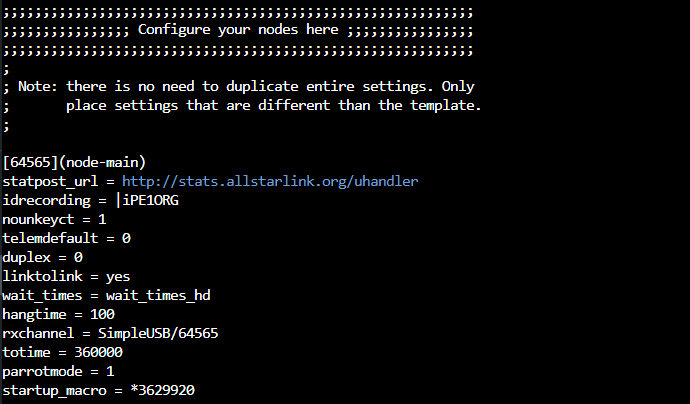
Do you have startup_macro defined in the right please - i.e. inside your [629920](node-main) stanza?
If you don't define it at all, restart Asterisk, and then call it with rpt fun 629920 *3506311 does it work?
Thanks for your reply. The extra line in Registrations was a suggestion from another amateur, and I've since removed it. I'll show the log file below; unless I'm looking incorrectly, it doesn't reference the Startup macro. There are a few warnings I can't quite figure out.
[2026-01-01 21:17:58.625] Asterisk 22.5.2+asl3-3.6.3-1.deb12 built by builder @ ``allstarlink.org`` on a aarch64 running Linux on 2025-11-19 19:34:45 UTC [2026-01-01 21:17:58.671] NOTICE[894] loader.c: 70 modules will be loaded. [2026-01-01 21:17:58.888] NOTICE[894] cdr.c: CDR simple logging enabled. [2026-01-01 21:17:58.891] NOTICE[894] dnsmgr.c: Managed DNS entries will be refreshed every 300 seconds. [2026-01-01 21:17:58.913] NOTICE[894] indications.c: Default country for indication tones: us [2026-01-01 21:17:58.913] NOTICE[894] indications.c: Setting default indication country to 'us' [2026-01-01 21:17:59.043] WARNING[894] chan_dahdi.c: Only FXO signalled channels may belong to a call group [2026-01-01 21:17:59.043] WARNING[894] chan_dahdi.c: Only FXO signalled channels may belong to a pickup group [2026-01-01 21:17:59.043] NOTICE[894] chan_dahdi.c: Ignoring any changes to 'userbase' (on reload) at line 23. [2026-01-01 21:17:59.043] NOTICE[894] chan_dahdi.c: Ignoring any changes to 'vmsecret' (on reload) at line 31. [2026-01-01 21:17:59.043] NOTICE[894] chan_dahdi.c: Ignoring any changes to 'hassip' (on reload) at line 35. [2026-01-01 21:17:59.043] NOTICE[894] chan_dahdi.c: Ignoring any changes to 'hasiax' (on reload) at line 39. [2026-01-01 21:17:59.043] NOTICE[894] chan_dahdi.c: Ignoring any changes to 'hasmanager' (on reload) at line 47. [2026-01-01 21:17:59.043] WARNING[894] chan_dahdi.c: Only FXO signalled channels may belong to a call group [2026-01-01 21:17:59.043] WARNING[894] chan_dahdi.c: Only FXO signalled channels may belong to a pickup group [2026-01-01 21:17:59.359] WARNING[904] pbx_config.c: users.conf is deprecated and will be removed in a future version of Asterisk [2026-01-01 21:17:59.607] NOTICE[951] app_rpt.c: Domain used for DNS node lookup is: ``nodes.allstarlink.org [2026-01-01 21:17:59.608] NOTICE[951] app_rpt.c: Normal Repeater Init 64565 [2026-01-01 21:17:59.612] NOTICE[955] chan_simpleusb.c: Channel 64565: Set option TONE VERIFY, mode: OFF(0). [2026-01-01 21:18:03.143] WARNING[963] app_rpt.c: statpost to URL '``http://stats.allstarlink.org/uhandler?node=64565&time=1767298682&seqno=2&nodes=&apprptvers=3.6.3&apprptuptime=3&totalkerchunks=0&totalkeyup``>
Your other question is whether the node I'm trying to connect to is available. This node (629920) is on 24/7.
Thanks for your reply. I removed all the P's, partly because it didn't make a difference. I'll add an image of my node settings (Stanza). I think this is in the right place then.
If I briefly power cycle the node after the first startup, during which the Startup_Macro doesn't work, the Startup_Macro works as it should. Only during the first "registration" does it go wrong.
Both my nodes (64565 & 634880) are on the same LAN; the node I'm trying to connect to (629920) is located elsewhere in the country.
My apologies for starting you down the path of looking at the /var/log/asterisk/messages.log file as this is one of the first places that "I" look for errors. To my surprise, it doesn't look like we log any messages on connection failures, not even with debug/verbose logging enabled.
But, I did find "a" way to get at least a confirmation that the connection attempt was made and not succeed. In the per-node section of rpt.conf you can add the following :
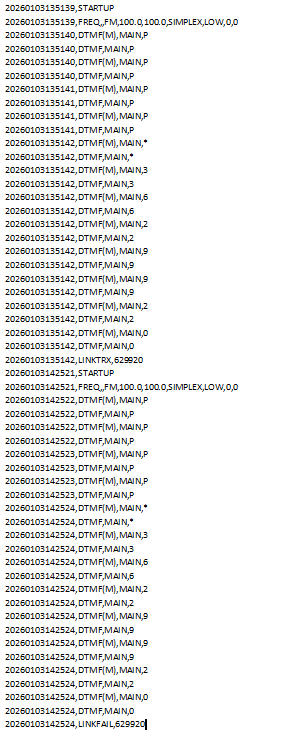
After restarting asterisk you should find a new /var/spool/asterisk/monitor/<your-node>/YYYYMMDD.txt file that will give a brief log of the node activity. In that file you will see the startup_macro DTMF digits being processed. You should see a LINKTRX line when a connection is successful and LINKFAIL when not.
Note: the archiving will consume space on the SD card so when no longer needed then please remember to remove (or comment out) the archivedir setting.
Your log file confirms that the startup macro is working perfectly and firing at every startup as intended, but the actual connection to node 629920 is failing sometimes due to some other issue (networking, configuration, etc).
Hi Mike, thanks for your reply. Above is my (Radioless) node stanza, including the Startup_Macro.
I did indeed assign the RPI a static IP address in the router using the MAC address. But isn't that wise? I do this deliberately so I can easily connect the node to another network. And I have to say, it's been working this way for six months.
IPv6 is inactive in the router. But that's on the WAN side. LAN only outputs IPv4
As I mentioned before, another amateur has the exact same problem. We're also connecting to the same node (629920). That's why I tried connecting my node to another, but that didn't work either. Just to rule out that it's not 629920
Good morning, thank you so much for your support. Hopefully, we can still find a solution.
I like to stay up-to-date, so I regularly (sometimes) check for new software updates and always update everything. I don't see anything wrong with that, but perhaps you have a different perspective. I have the feeling that the startup macro has started failing after running a bunch of updates again.
What I can try now is placing one of my nodes on a different network. This way, I can hopefully exclude my own network.
Is there perhaps another way to permanently connect a node to another node? And a way where my node will always reconnect if the connected node drops out for a moment? This reconnect does happen when I manually connect the nodes to each other via Allmon3 and select permanent.
If you're using static node maps inside of rpt.conf to point to each other, than a delay in registration would not affect the ability to connect. Registration would only impede the issue if the node being called doesn't already "know" about the caller.
So to be 100% clear, this is only occuring on your network at a FIRST startup of Asterisk during the boot process?
And, if the above is YES, it's NEVER occurring during any other restart of Asterisk after the host is up?
If that's the case, it sounds like something with your environment isn't "up" from a networking perspective even though systemd believes the network is "up". Please try this:
Run systemctl enable systemd-networkd-wait-online.service -- this enables the "more robust" checking that the network is "online" before starting Asterisk.
Reboot
See if the behavior changes
If the behavior changes, then you're all set. If it DOES NOT change:
Run systemctl edit asterisk.service
Edit the unit file in the following way:
### Anything between here and the comment below will become the contents of the drop-in file

[Service]
ExectStartPre=sleep 120

### Edits below this comment will be discarded
Hang on a second... if all we care about is linking to 629920 on startup, then why are we using ilink 3 (transceive) instead of ilink 13 (permanent transceive)?
For context, a "permanent" connection in app_rpt basically just means a connection that will keep trying to connect over and over, instead of timing out like a regular connection.
A dead simple solution to this problem is to just use ilink 13. If the network isn't "up" yet when the macro is executed, it will just keep trying to connect forever, and will never time out. When the network or whatever the holdup is, is finally "up" it will just connect.
@N8EI
Yes, that's right. This only happens during the first Asterisk startup and never during a restart or power cycling the RPI. It always works then.
@Mason10198
I can't believe this was always right in front of me. This Ilink 13 is exactly what I requested, and yet I never saw it in the RPT.conf.
And it works. I created the Startup_Macro *813 (*813629920) and the connection is now always established. Sometimes it even takes 30 seconds, but the connection is established.
@N8EI
I'm going to implement the changes you suggested now and see if the speed has improved, and maybe even the old Startup_Macro *3 will work again.
 Hi.
Hi.