ASL-2.0.0-beta.6 Ready for Download

Download ASL 2.0.0-beta.6 here
Report Bugs/Issues here

This is a minor release in terms of bugs / features and is mostly a maintenance release.

  • Add dynamic MOTD on /etc/issue and /etc/motd
  • Move customizations to .deb packages (ASL-Asterisk repo)
  • Update versions in app_rpt
  • Bug fixes

Download ASL 2.0.0-beta.6 here

I submitted a issue on GitHub but thought I’d also reply here for discussion.

When using the ASL-Menu to set a password nothing happens as can be seen in the attached video. Am I doing something wrong?

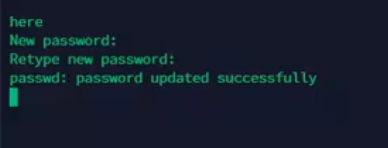
As you can see from this screen shot taken at 29 seconds passwd is saying it was successful:

image

GitHub issue link:
https://github.com/AllStarLink/ASL-Live-Build/issues/22

Thanks for this! I’ll look into it.

@KK9ROB I on that in the new first-time script that’s on GitHub. Maybe I fixed it. Seemed ok while testing.

Tried new beta image. 3 issues

  1. Raspi-config won’t assign any other user then Pi. I logged in as root to run it (not su’d, logged in)

  2. LAN connected being forced to static IP of 169.254.35.57 even after running asl-menu to select DHCP and rebooting

  3. Receive ā€œCan’t communicate with wpa_supplicantā€ (from raspi-config menu) despite fact that I created a correct /etc/wpa_supplicant/wpa_supplicant.conf. Also, the binary does exist in /usr/sbin

These issues are identical on a Pi3+ and Pi4

  1. Pi user isn’t used – only repeater and root
  2. The 169.254 IP is an auto-assigned IP when a dynamic IP can’t be retrieved. Check your cable connections, try a different ethernet cable, or try using WiFi
  3. wpa_supplicant is a daemon that runs for WiFi. Try running systemctl enable wpa_supplicant
  1. I know that but I’m just reporting what raspi-config was doing. I tried to change its forced user of pi to root but it would not allow it.

  2. Cable was good and the same cable/Pi had no issues obtaining an IP assignment from my router if NOT running the beta but rather ASL 1.01 I had a different SD card

  3. I’m aware what wpa_supplicant is. I checked for the daemon was running (ps aux | grep wpa) and it was. As it turns out, there is no wpa_supplicant.conf supplied as part of the distro image. But even after I created a valid one, raspi-config reported what it did. Seems the image build needs some tweaking…

Is the rxnotch filter available in beta,6 ?

If not, can somebody please make one?

Thank you

Ken
KE2N

Hi - Just checking in to see if 2.0.0-beta.6 is still the latest version, as it was released 6 months ago? Are there any plans to move this out of beta to a mainstream/stable release? Have there been no updates in 6 months?

Just curious - and wanting to keep all my things up-to-date.

Thanks!

  • Trevor
    N6TJL

2.0.0-beta.6 is still the latest version. I will check with the team to see where we are at with it.

Jim, K6JWN

I’ve just created the image and performed the first boot and login on a Rapberry Pi 3B+ and have the following line printed above the shell prompt:

-bash: /usr/bin/grep: cannot execute binary file: Exec format error

I gotta admit in all of my years of Linux and Debian that this is first for me!

Apparently grep has an issue as I tried using it to grep for ā€˜bin/grep’ in the dot files and get the same error message.

I suppose this is a clue, my understanding is that the image is supposed to be Debian 10 (Buster) and after trying to update the system and seeing that fail, I checked /etc/apt/sources.list and it is pointing to rasbian.raspberrypi.org.

Now I see everything in /etc/os-release references Raspbian, but I don’t think the Raspberry Pi organization supports Raspbian any more in favor of Raspberry Pi OS.
Color me confused…

There some repo update that needs to happen but I don’t remember the command. Please do an apt-get update and post or Google the error.

This the one you’re thinking of?

curl -s http://apt.allstarlink.org/repos/repo_signing.key | sudo apt-key add -
sudo apt update

What user are you logged in as? If root, simply use

passwd new password

If repeater, then

sudo passwd new password

ASL 2.0 Beta6 is the latest version as of 12/23/2022

Download
https://downloads.allstarlink.org/index.php?b=ASL_Images_Beta

Beta Bug Reports

Have a problem with the new beta? Submit a bug/issue report here:

Beta bugs discussion