After 4 plus years of several of my remote nodes that use a Cell Hotspot device can no longer register the Node and use the VPN IP Address, Supermon shows the IP address but ASL will not register the Node, turn off the VPN it registers.
This is happening on 2 of my ASL3 Nodes PC versions running on Dell Wyse 3040 and 2 Hamvoip Nodes.
As I stated, these have been this way for 4 years on Hamvoip and past year with the Wyse ASL3, they have always registered and be able to connect to the node from other nodes. The VPN is working I can use the VPN IP address and access the Supermon Page, access remote via port 5038, can SSH it to it.
Yes they are using IAX registration as I stated they were working now they're not, I do not update any unit with out me being ON-Site in case the updates go bad! So no updates have been done to ASL3, Hamvoip of course not.
I would take it something was changed on the ASL Servers!
Can you share the node number of a specific node (or nodes) that can no longer register?
Geez... I know better than that!! I know you need to post the node numbers! LOL!!
575351, 575356
Geez... I know better than that!! I know you need to post the node numbers! LOL!!
575351, 575356
Oh... 575351 is ALS 3, 575356 is Hamvoip
I don't see any attempt for either of those nodes in the last ~28-48 hours. What IP do you expect them to be coming from? I wonder if you ended up on a blocklist somehow...
Similar issues here also at Node 669770 and 669771 I started seeing massive issue and timeouts since this past saturday night after 9pm EST, 11/7/26. 669770 is on a Rasp PI 5 Bookworm and 669771 is on a VM with Trixie. If I work around the VPN, I get registered on Allstar, but lose capabilities for Echolink using ports 5198,5199 UDP. de Ag3U
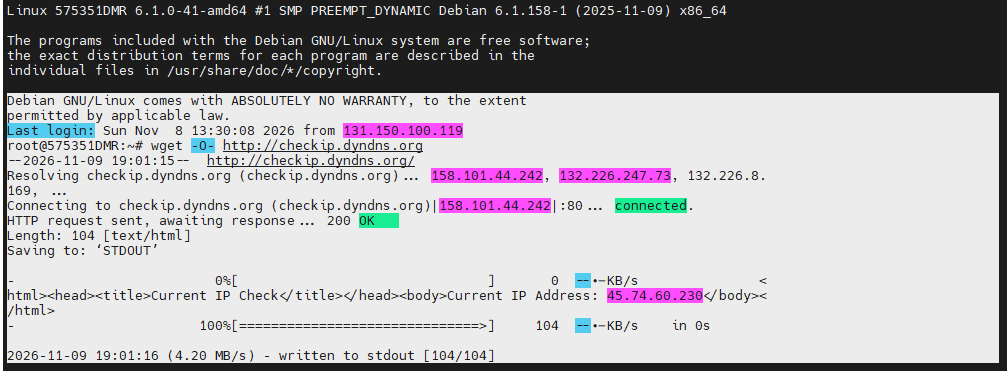
Can you provide an IP for the node? Even a wget -O- http://checkip.dyndns.org would be helpful. I"m thinking that one of the blocklists we use to knock down bad traffic has something interfering with legit users.
575351 is on 45.74.60.230
575356 is on 45.74.60.144
That whole netblock is flagged as malicious and blocked... let me investigate...
wget
Debian GNU/Linux comes with ABSOLUTELY NO WARRANTY, to the extent
permitted by applicable law.
Last login: Sun Nov 8 13:30:08 2026 from 131.150.100.119
root@575351DMR:~# wget -O- http://checkip.dyndns.org
--2026-11-09 19:01:15-- http://checkip.dyndns.org/
Resolving checkip.dyndns.org (checkip.dyndns.org)... 158.101.44.242, 132.226.247.73, 132.226.8. 169, ...
Connecting to checkip.dyndns.org (checkip.dyndns.org)|158.101.44.242|:80... connected.
HTTP request sent, awaiting response... 200 OK
Length: 104 [text/html]
Saving to: ‘STDOUT’
-
0%[ ] 0 --.-KB/s < html><head><title>Current IP Check</title></head><body>Current IP Address: 45.74.60.230</body>< /html> -
100%[==============================>] 104 --.-KB/s in 0s
2026-11-09 19:01:16 (4.20 MB/s) - written to stdout [104/104]
45.74.0.0/18 (45.74.0.0/18 to 45.74.63.255) is now listed in the SpamHaus DROP list - the Do Not Route or Peer list. They define that as "The Spamhaus DROP lists consist of netblocks that are leased or stolen by professional spam or cyber-crime operations, and used for dissemination of malware, trojan downloaders, botnet controllers, or other kinds of malicious activity."
Is this an ISP or a VPS host or ??
These belong to purevpn.com
Not a free service I pay for 10 vpn and port forwarding.
Sorry you are going thru this also… tho glad it was just not me!
So PureVPN has been listed as a malicous actor by SpamHaus - https://check.spamhaus.org/results?query=45.74.60.230.so that's why you cannot register. I will have to research this more tomorrow but SpamHaus's lists are pretty solid in terms of bad actors vs. collateral damage. Since you're a customer, can you ask PureVPN to submit to get off the blocklist?
So that is their Seattle server , I just did their New York server and using this and the node registered 172.111.139.168
Well did a New York server with ip address 172.111.139.168 after 10 minutes stopped working. Can’t believe all of purevpn ip addresses are flagged as bad actors!!
Will email them tomorrow.
If this is true, has anyone filed a report with FBI, FCC, CIA or any other alphabet police agency or we just flag a company cause we think they might or could be bad.
Hey fellas, I use 44Connect's VPN with my ASL V3 nodes.
This was happening to me also, the VPN was no longer working.
My FIX was to "sudo wg-quick down wg0" each node, then do a "sudo apt update / upgrade".
After that my ASL v3 nodes had the latest web browser thingy but also the VPNs started working again after a reboot.
Nice new looking web browser thingy too 
I did a little research on this. PureVPN is hosting its exit nodes - at least the ones you're using - at a so-called "bulletproof" hosting company Secure Internet LLC / pointtoserver[.]com. The "bulletproof" means it takes all customers regardless of what they're doing and has repeatedly ignored complaints of abuse. You can see the justification for the block here: https://check.spamhaus.org/results/?query=SBL688605. The issue isn't so much that PureVPN is blocked but that the larger hosting provider it's purchasing exit nodes and transit from is blocked.
What I would suggest is try different exit node servers and plug your new IP into https://check.spamhaus.org/ to see if it's listed. If you can find an exit node not serviced by Secure Internet LLC, you'll have a better shot.
The reasons we have to run these lists is a lot of the ranges on the SpamHaus and EmergingThreats blocklists are titanic wasters of our transit bandwidth (and thus costs us $$$), especially when they perceive we might be running a telephone endpoint due to us having IAX2 open. In fact, I've been thinking about adding a blocklist toggle into the new ASL WebUI for node owners for the same reason.