Hi,
I have a very strange problem with DIAL + USB URIs.
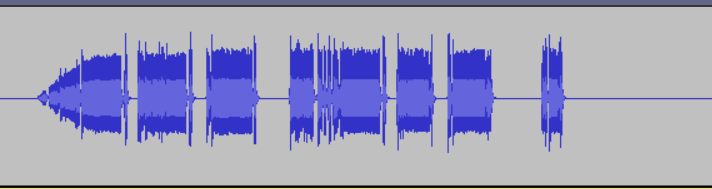
I get choppy audio after a couple of days or maybe several hours of constant use.
Restarting asterisk or even the PC wont solve the problem.
The problem only goes away if I connect the URI to another USB or shut down the PC for several hours.
Maybe some temperature problem on the USB card??
I’m using a standard PC (i5 + 8GB) with 2 USB URIs.
To test the problem I connected a tone generator to the URIs.
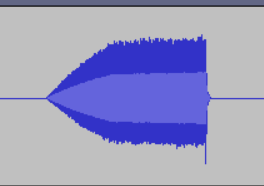
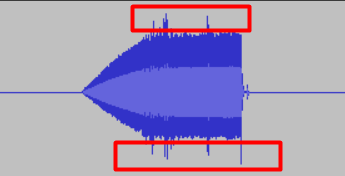
These are some examples of the saved audio files in asterisk:
Normal
After several hours
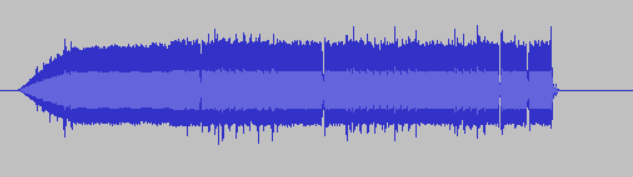
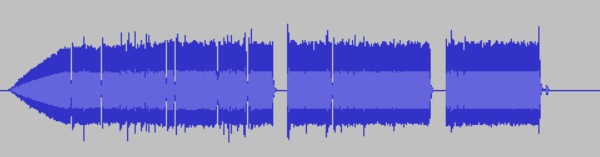
after one day
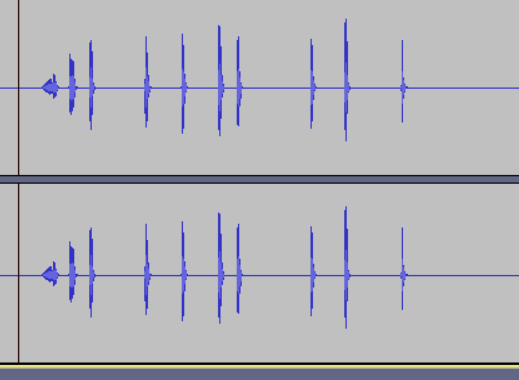
Some advice would be very appreciated
Thanks in advance
Best Regards
John
I am testing with 3 o 4 different PC models with the same problem, all new models…
Some of them can run for 2 days without the problem, some get the audio chopped in just a few hours.
I’m using usbradio. Do you think that the simpleusb can work better?
I have no experience with simpleusb, and I’m willing to pay some consulting hours to solve this problem…
Some advice would be very appreciated
Thanks in advance
Best Regards
John
···
On Tue, Apr 17, 2018 at 3:48 PM, Bob Pyke k6ecm1@gmail.com wrote:
From my experience, it’s not the URI; more likely an issue with the computer USB controller in the PC. …Spent a bit of time finding that one.
Thanks,
Bob
K6ECM
73
On Apr 17, 2018, at 7:05 AM, John Locke jldharma@gmail.com wrote:
Hi,
I have a very strange problem with DIAL + USB URIs.
I get choppy audio after a couple of days or maybe several hours of constant use.
Restarting asterisk or even the PC wont solve the problem.
The problem only goes away if I connect the URI to another USB or shut down the PC for several hours.
Maybe some temperature problem on the USB card??
I’m using a standard PC (i5 + 8GB) with 2 USB URIs.
To test the problem I connected a tone generator to the URIs.
These are some examples of the saved audio files in asterisk:
Normal
<image.png>
After several hours
<image.png>
<image.png>
<image.png>
after one day
<image.png>
<image.png>
Some advice would be very appreciated
Thanks in advance
Best Regards
John
App_rpt-users mailing list
App_rpt-users@lists.allstarlink.org
http://lists.allstarlink.org/cgi-bin/mailman/listinfo/app_rpt-users
To unsubscribe from this list please visit http://lists.allstarlink.org/cgi-bin/mailman/listinfo/app_rpt-users and scroll down to the bottom of the page. Enter your email address and press the “Unsubscribe or edit options button”
You do not need a password to unsubscribe, you can do it via email confirmation. If you have trouble unsubscribing, please send a message to the list detailing the problem.
App_rpt-users mailing list
App_rpt-users@lists.allstarlink.org
http://lists.allstarlink.org/cgi-bin/mailman/listinfo/app_rpt-users
To unsubscribe from this list please visit http://lists.allstarlink.org/cgi-bin/mailman/listinfo/app_rpt-users and scroll down to the bottom of the page. Enter your email address and press the “Unsubscribe or edit options button”
You do not need a password to unsubscribe, you can do it via email confirmation. If you have trouble unsubscribing, please send a message to the list detailing the problem.
Hi John,
When you start to have the audio problems, try running the dahdi_test
program from a bash prompt. Here are sample numbers from a Raspberry Pi
3B plus, with turbo mode enabled:
[root@kb4fxc-portable asterisk]# dahdi_test -c 100
Opened pseudo dahdi interface, measuring accuracy...
99.992% 99.989% 99.996% 99.995% 99.996% 99.996% 99.993% 99.995%
99.994% 99.992% 99.995% 99.995% 99.995% 99.996% 99.993% 99.995%
99.995% 99.995% 99.993% 99.994% 99.994% 99.995% 99.994% 99.994%
99.994% 99.993% 99.994% 99.994% 99.994% 99.994% 99.994% 99.994%
99.994% 99.993% 99.994% 99.993% 99.995% 99.995% 99.995% 99.996%
99.995% 99.995% 99.995% 99.995% 99.995% 99.996% 99.995% 99.994%
99.995% 99.994% 99.995% 99.995% 99.995% 99.995% 99.995% 99.995%
99.996% 99.994% 99.995% 99.995% 99.995% 99.995% 99.995% 99.995%
99.995% 99.994% 99.995% 99.995% 99.995% 99.995% 99.996% 99.995%
99.995% 99.994% 99.995% 99.995% 99.995% 99.996% 99.995% 99.995%
99.995% 99.994% 99.995% 99.995% 99.995% 99.995% 99.996% 99.994%
99.995% 99.994% 99.995% 99.996% 99.994% 99.995% 99.995% 99.995%
99.995% 99.993%
--- Results after 98 passes ---
Best: 99.996% -- Worst: 99.989% -- Average: 99.994621%
Cummulative Accuracy (not per pass): 99.995
73, David KB4FXC
···
On Thu, 19 Apr 2018, John Locke wrote:
I am testing with 3 o 4 different PC models with the same problem, all new
models...
Some of them can run for 2 days without the problem, some get the audio
chopped in just a few hours.
I'm using usbradio. Do you think that the simpleusb can work better?
I have no experience with simpleusb, and I'm willing to pay some consulting
hours to solve this problem...
Some advice would be very appreciated
Thanks in advance
Best Regards
John
On Tue, Apr 17, 2018 at 3:48 PM, Bob Pyke <k6ecm1@gmail.com> wrote:
> From my experience, it’s not the URI; more likely an issue with the
> computer USB controller in the PC. ...Spent a bit of time finding that one.
>
> Thanks,
> Bob
> K6ECM
> 73
>
>
> On Apr 17, 2018, at 7:05 AM, John Locke <jldharma@gmail.com> wrote:
>
> Hi,
> I have a very strange problem with DIAL + USB URIs.
> I get choppy audio after a couple of days or maybe several hours of
> constant use.
> Restarting asterisk or even the PC wont solve the problem.
> The problem only goes away if I connect the URI to another USB or shut
> down the PC for several hours.
> Maybe some temperature problem on the USB card??
>
> I'm using a standard PC (i5 + 8GB) with 2 USB URIs.
> To test the problem I connected a tone generator to the URIs.
> These are some examples of the saved audio files in asterisk:
>
> Normal
> <image.png>
>
> After several hours
> <image.png>
>
> <image.png>
>
> <image.png>
>
> after one day
> <image.png>
>
> <image.png>
>
> Some advice would be very appreciated
> Thanks in advance
> Best Regards
> John
>
>
>
>
>
> _______________________________________________
> App_rpt-users mailing list
> App_rpt-users@lists.allstarlink.org
> http://lists.allstarlink.org/cgi-bin/mailman/listinfo/app_rpt-users
>
> To unsubscribe from this list please visit http://lists.allstarlink.org/
> cgi-bin/mailman/listinfo/app_rpt-users and scroll down to the bottom of
> the page. Enter your email address and press the "Unsubscribe or edit
> options button"
> You do not need a password to unsubscribe, you can do it via email
> confirmation. If you have trouble unsubscribing, please send a message to
> the list detailing the problem.
>
>
> _______________________________________________
> App_rpt-users mailing list
> App_rpt-users@lists.allstarlink.org
> http://lists.allstarlink.org/cgi-bin/mailman/listinfo/app_rpt-users
>
> To unsubscribe from this list please visit http://lists.allstarlink.org/
> cgi-bin/mailman/listinfo/app_rpt-users and scroll down to the bottom of
> the page. Enter your email address and press the "Unsubscribe or edit
> options button"
> You do not need a password to unsubscribe, you can do it via email
> confirmation. If you have trouble unsubscribing, please send a message to
> the list detailing the problem.
>