The screenshot is my best effort at finding the version info of my setup. I copy and pasted the command line that was shown when I opened the window to write this post in the bash shell interface and the command was not recognized for some reason. I worked all day a few days ago to get my allstar node set up and got everything working up until I went to login on http://xxx.xxx.x.xxx/supermon/ The web interface loaded up but when I went to log in, it flashed a tiny message saying “sorry, login failed” I have verified that the login credentials are correct in allmon.ini, although there are two sets of login credentials for some reason and I do not know where the second one came from. I changed everywhere it said 1998 to my node number but the second set of login credentials have 1999 in the same places that the other set had 1998. When I initially tried to get to the web interface it would not load but it did load after I changed the host IP under my node number to the IP of my Allstar setup. I had to use three different how to sources to configure my node but it is possible I could have still missed something.
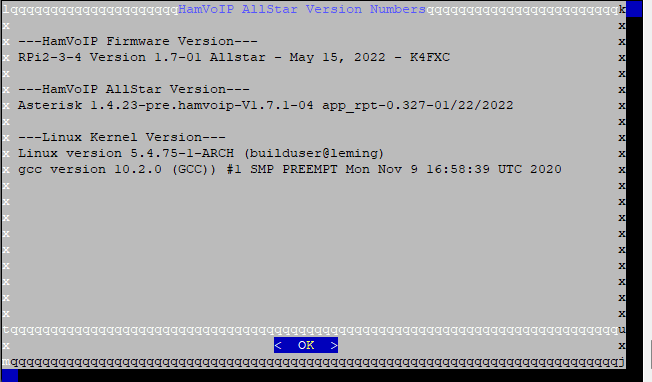
You seem to have a random mix of HamVOIP and ASL software you're trying to use which don't work together as they are different platforms. I would suggest starting fresh with the step-by-step directions to get a fully working node and then you can add on third-party tools like Supermon if you need them.
I downloaded the package from https://hamvoip.org/ and installed it but haven’t added any additional software that I know of. The different software must have come from the hamVOIp software download. It definitely might be worth reinstalling the whole package and start from the bottom from the source you mentioned.
HamVOIP is an entirely different older platform than AllStarLink. You cannot follow any ASL directions for configuration on HamVOIP.
Ok, I reinstalled the image on my raspberry pi and followed the instructions you provided. My goal is to create a radioless allstar node and I am trying to get that to work but it seems like it might be a big shift in topic that maybe I should create another thread for. For the most part things seem to be working but I am just having trouble with my headset and the transmit function and stuff.
Is your headset connected to a compatible sound interface? Only certain devices are supported with app_rpt.
If asl-find-sound finds your headset, then this will help with setup:
the headset is the Mpow PA071A. I have tried connecting to the parrot node (node number 55553) but I can not hear anything and even when I press the minus button it does not play anything back.
I am slowly getting the hang of terminal but I am still learning. How do I get to the point that I can edit the files he specifies? I do not know many command lines and mostly have to copy and paste them to get things done in terminal but it doesn’t look like I can just copy and paste the information that he says without adding additional commands.
Your best bet is to edit files using the nano editor, which is pretty easy to learn. From the command line, nano <filename>.
If you enter the following commands
export EDITOR=/usr/bin/nano
export VISUAL=/usr/bin/nano
you will have nano available in asl-menu as well.