Two nodes on one pi..... main node works fine but second node will not connect out

I am new ASLv3, set up a node on pi 5 and used it for months. Now I added a second node to pi, and everything seems fine but the for the second node not being able to connect out.

I had this two node setup working for years with the other software. I have tried to research this issue but have not found a reason for the failure of the second node to connect out.
I am not well versed in ASLv3 but tried to follow all the steps I knew to take to install the second node.
My setup…pi5 using a 2m and 1.25m alinco with repeater builder cards usb to the pi. The nodes are 47450 and 47452. I have supermon running and both nodes are showing and working correctly as far as I can tell. I am just missing something as far as how I set up 47452.
Can someone lead me in the right direction to solve this.
Thanks
Phil
AG5EY

Can I ask what you determined your connection outbound,

was it one node or did you try many outside your local network ?.

Is the node registered ? What is the node number ?

The main node I have had running is 47450 and it works fine both before and after I added the second node. The second node is 47452 … both nodes are registered and have been for years. I had both working fine on an older pi using Hamvoip. I switched to ASLv3 when it came out and started with 47450 and ran it a single node for months. I then went in ASL and added the second node yesterday. All seems fine except only 47450 can make a connection out to another node. I can connect to 47452 with 47450 but again with 47452 can not connect to another node out. If I have left something out that I need to add to this , I will get what ever info is needed. Thanks

The node 47452 is registered and connectable from the network.
The issue leads us to the dial plan.
A mistake in extensions.conf for outbound connections for the node.

If you want additional eyes to help you, attach extensions.conf to a post so we can look it over for a related error.

Thanks for the reply, not sure how to post the file here is my best try

tried to post screenshots of the rest of the file, but as a new user it would only allow one attachment. If I need to post the rest of the file will do multiple post I guess.
Phil

It might help you on a windows machine to download and install ‘winscp’

Makes viewing and editing these files easier and quicker and you can quickly download the file.
Perhaps try to attach the file in a private message to me.

First thing i noticed is you did not add NODE = 47452 in your (globals). I’m just learning but I’ve seen Ham Radio Crusader adding that in his videos.

Phil,
Can you also send your rpt.conf file as well.

I have been unable to send to gmail addresses till I fix my server policy spf/dmark after an update on my personal webservers… Again !

I have finished an install of ASL3 for K2ETS. Following instructions carefully I WAS able to get the two nodes ( 27274, 27273 ) working. After reading this thread, I looked at my ’ extensions.conf ’ file, and I only see :
[globals]
HOMENPA = 999 ; change this to your Area Code
NODE = 27274 ; change this to your node number
No second node?

The current basic default setup does not include use of global variables designating
NODE, NODE1 etc.

But if you are using a older file brought forward or changed it yourself to the old standard, it has to be looked at.

The 1st ‘un-commented’ line allows any node number/extension to start the stanza and it later route’s checks to allow/deny lists and finally the connection itself or hangup…

And the only way to know what is actually in the file, is to see it. No guessing.
Folks often change things based on old posts trying to fix a problem and forget to change it back.

Mike
I guess all the files I sent to your email are not getting through, so here goes on getting my .conf files uploaded on this forum:

[general]

static = yes ; These two lines prevent the command-line interface
writeprotect = yes ; from overwriting the config file. Leave them here.

[globals]
HOMENPA = 325 ; change this to your Area Code
NODE = 47450 ; change this to your node number

[default]
exten => i,1,Hangup

[radio-secure]
;exten => ${NODE},1,rpt(${EXTEN})
exten => _XXXX!,1,NoOp(Connect from node: ${CALLERID(num)})
same => n,NoOp(Connect to: ${EXTEN})
;same => n,NoOp(The IAXPEER is ${IAXPEER(CURRENTCHANNEL)})
same => n,NoOp(The Channel IP is ${CHANNEL(peerip)})

;If channel IP eq localhost go to connect
same => n,GotoIf($["${CHANNEL(peerip)}" = "127.0.0.1"]?connect)

;If allowlist/extension dosen't exist check the denylist
same => n,GotoIf($[${DB_KEYCOUNT(allowlist/${EXTEN})} = 0]?denylist) ;goto denylist
;If allowlist/extension/callerid exists go to connect
same => n,GotoIf(${DB_EXISTS(allowlist/${EXTEN}/${CALLERID(num)})}?connect) ;goto connect
same => n,NoOp(${EXTEN} not in allowlist, Hangup)
same => n,Hangup

;If denylist/extension/callerID doesn't exist goto connect
same => n(denylist),GotoIf(${DB_EXISTS(denylist/${EXTEN}/${CALLERID(num)})}?:connect) ;don't goto connect
same => n,NoOp(${EXTEN} is in denylist, Hangup)
same => n,Hangup

same => n(connect),rpt(${EXTEN})
same => n,Hangup

[iaxrpt]
; Entered from iaxrpt in iax.conf
; Info: The X option passed to the Rpt application
; disables the normal security checks.
; Because incoming connections are validated in iax.conf,
; and we don’t know where the user will be coming from in advance,
; the X option is required.
exten => ${NODE},1,rpt(${EXTEN}|X) ; NODE is the Name field in iaxrpt

[iax-client] ; for IAX VoIP clients.
exten => ${NODE},1,Ringing()
same => n,Wait(10)
same => n,Answer()
same => n,Set(CALLSIGN=${CALLERID(name)})
same => n,NoOp(Caller ID name is ${CALLSIGN})
same => n,NoOp(Caller ID number is ${CALLERID(number)})
same => n,GotoIf(${ISNULL(${CALLSIGN})}?hangit)
same => n,Playback(rpt/connected-to&rpt/node)
same => n,SayDigits(${NODE})
same => n,rpt(${NODE}|P|${CALLSIGN}-P)
same => n(hangit),NoOp(No Caller ID Name)
same => n,Playback(connection-failed)
same => n,Wait(1)
same => n,Hangup

; Comment-out the following clause if you want Allstar Autopatch service
[pstn-out]
exten => _NXXNXXXXXX,1,playback(ss-noservice)
same => n,Congestion

; Un-comment out the following clause if you want Allstar Autopatch service
;[pstn-out]
;exten => _NXXNXXXXXX,1,Dial(IAX2/allstar-autopatch/${EXTEN})
; same => n,Busy

[invalidnum]
exten => s,1,Wait(3)
same => n,Playback(ss-noservice)
same => n,Wait(1)
same => n,Hangup

[radio]
exten => _X11,1,Goto(check_route,${EXTEN},1);
exten => _NXXXXXX,1,Goto(check_route,1${HOMENPA}${EXTEN},1)
exten => _1XXXXXXXXXX,1,Goto(check_route,${EXTEN},1)
exten => _07XX,1,Goto(parkedcalls,${EXTEN:1},1)
exten => 00,1,Goto(my-ip,s,1)

[check_route]
exten => _X.,1,Noop(${EXTEN})
; no 800
exten => _1800NXXXXXX,2,Goto(invalidnum,s,1)
exten => _1888NXXXXXX,2,Goto(invalidnum,s,1)
exten => _1877NXXXXXX,2,Goto(invalidnum,s,1)
exten => _1866NXXXXXX,2,Goto(invalidnum,s,1)
exten => _1855NXXXXXX,2,Goto(invalidnum,s,1)
; no X00 NPA
exten => _1X00XXXXXXX,2,Goto(invalidnum,s,1)
; no X11 NPA
exten => _1X11XXXXXXX,2,Goto(invalidnum,s,1)
; no X11
exten => _X11,2,Goto(invalidnum,s,1)
; no 555 Prefix in any NPA
exten => _1NXX555XXXX,2,Goto(invalidnum,s,1)
; no 976 Prefix in any NPA
exten => _1NXX976XXXX,2,Goto(invalidnum,s,1)
; no NPA=809
exten => _1809XXXXXXX,2,Goto(invalidnum,s,1)
; no NPA=900
exten => _1900XXXXXXX,2,Goto(invalidnum,s,1)

; okay, route it
exten => _1NXXXXXXXXX,2,Goto(pstn-out,${EXTEN:1},1)
exten => _X.,2,Goto(invalidnum,s,1)

[my-ip]
exten => s,1,Wait(1)
same => n,SayAlpha(${CURL(http://myip.vg)})
same => n,Hangup

[allstar-sys]
exten => _1.,1,Rpt(${EXTEN:1}|Rrpt/node:NODE:rpt/in-call:digits/0:PARKED|120)
exten => _1.,n,Hangup

exten => _2.,1,Ringing
exten => _2.,n,Wait(3)
exten => _2.,n,Answer
exten => _2.,n,Playback(rpt/node)
exten => _2.,n,Saydigits(${EXTEN:1})
exten => _2.,n,Rpt(${EXTEN:1}|P|${CALLERID(name)}-P)
exten => _2.,n,Hangup

exten => _3.,1,Ringing
exten => _3.,n,Wait(3)
exten => _3.,n,Answer
exten => _3.,n,Playback(rpt/node)
exten => _3.,n,Saydigits(${EXTEN:1})
exten => _3.,n,Rpt(${EXTEN:1}|Pv|${CALLERID(name)}-P)
exten => _3.,n,Hangup

exten => _4.,1,Ringing
exten => _4.,n,Wait(3)
exten => _4.,n,Answer
exten => _4.,n,Playback(rpt/node)
exten => _4.,n,Saydigits(${EXTEN:1})
exten => _4.,n,Rpt(${EXTEN:1}|D|${CALLERID(name)}-P)
exten => _4.,n,Hangup

exten => _5.,1,Ringing
exten => _5.,n,Wait(3)
exten => _5.,n,Answer
exten => _5.,n,Playback(rpt/node)
exten => _5.,n,Saydigits(${EXTEN:1})
exten => _5.,n,Rpt(${EXTEN:1}|Dv|${CALLERID(name)}-P)
exten => _5.,n,Hangup

[allstar-public]

exten => s,1,Ringing
same => n,Set(RESP=${CURL(https://register.allstarlink.org/cgi-bin/authwebphone.pl?${CALLERID(name)})})
same => n,Set(NODENUM=${CALLERID(number)})
same => n,GotoIf($[“${RESP:0:1}” = “?”]?hangit)
same => n,GotoIf($[“${RESP:0:1}” = “”]?hangit)
same => n,GotoIf($[“${RESP:0:5}” != “OHYES”]?hangit)
same => n,Set(CALLSIGN=${RESP:5})
;exten => s,n,GotoIf($[${DB_EXISTS(whitelist/${CALLSIGN})}]?:hangit) ; Not in whitelist
same => n,Wait(3)
same => n,Playback(rpt/node,noanswer)
same => n,Saydigits(${NODENUM})
same => n,Set(CALLERID(name)=${CALLSIGN})
same => n,Set(CALLERID(num)=0)
same => n,Rpt(${NODENUM}|X)
same => n,Hangup
same => n(hangit),Answer
same => n,Wait(1)
same => n,Hangup

#tryinclude custom/extensions.conf
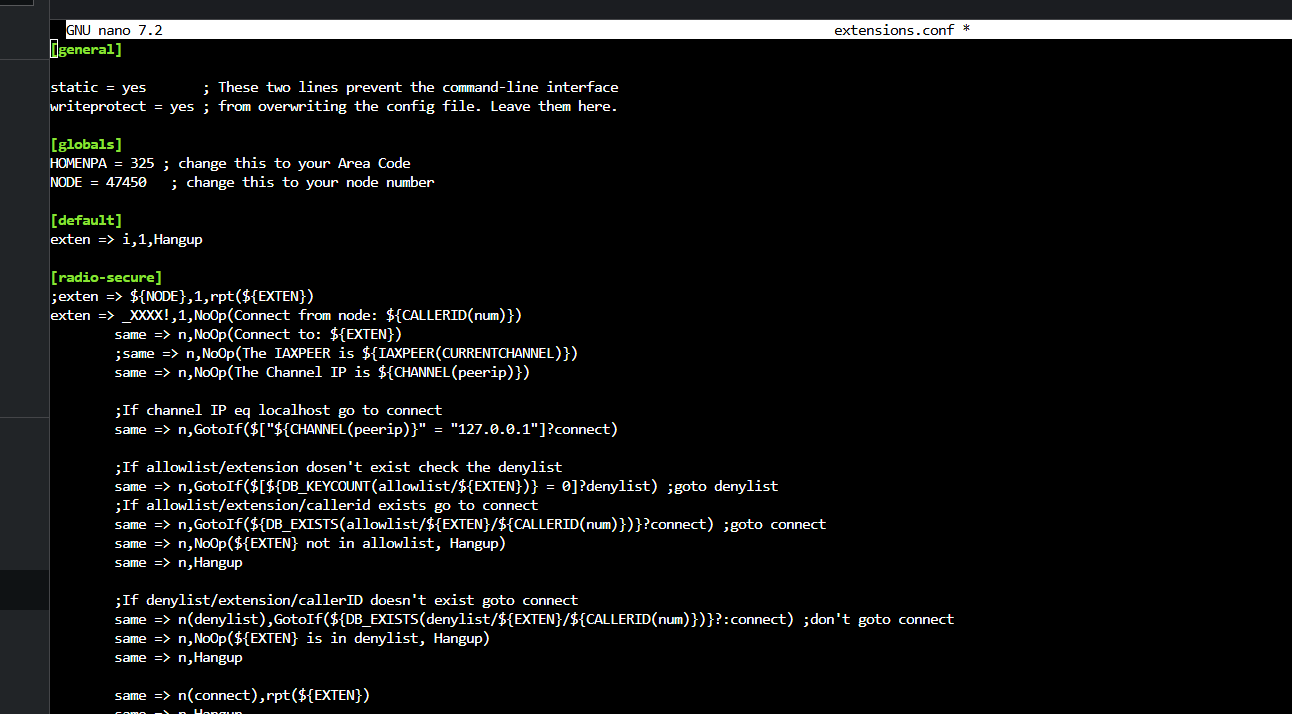
Looks like I cant send files to your email address and I cant attach more than one file on this forum as a new user. so if there is another way to get you my rpt.conf file, let me know.

Phil

Thanks, I will try that… I also noticed it was not there but was waiting for someone to say to do so. I added 47452 by using to the steps to set up a new node, thus I was under the impression that the program would add 4752 in all the places it needed to be just like it did with 4750. I will report back my results.

Thanks again
Phil

Just entered my node = 47452 and that did not make any changes that I can see, did a restart of asterisk and the server.

Thanks

Phil

I should be able to rx your email, I just can’t send a reply until I fix my cbpolicyd on my servers. Google no like.
I got the extensions.conf file.

I would like to see your rpt.conf file.

Mike

back in shack… I forgot that this forum will not let me post two files as a new user. Is there another way to send you the rpt.conf.

If you have the software to link to my computer, that is fine with me also.

Phil

Mike

Ok I sent the rpt.conf again from my gmail account. If you do not get it let me know.

Phil

Yes I am getting your email. Just a bit busy at the moment.
When it rains, it pours.

I have a tough time looking these files over as it’s hard to debug these files with the use of templates.

Try adding these lines to your nodes stanzas

47450
statpost_url = http://stats.allstarlink.org/uhandler
idrecording = |iAG5EY
duplex = 1
hangtime = 400
rxchannel = SimpleUSB/47450
functions = functions ; Repeater Function stanza
link_functions = functions ; Link Function stanza

47452
statpost_url = http://stats.allstarlink.org/uhandler
idrecording = |iAG5EY
duplex = 1
hangtime = 400
rxchannel = SimpleUSB/47452
functions = functions ; Repeater Function stanza
link_functions = functions ; Link Function stanza

Save and restart.
Sorry i don’t have the time to comb through this better.

Mike
Thank you for your time and effort. The added lines had no effect.
I will just stay as is and keep digging.

Thanks again
Phil