Supermon 7.4 install issue

I’m trying to install Supermon 7.4 on my new node running ASL3. I have one node running HamVOIP, but I wanted to try the new software. I’m following the KD5FMU’s video on installation but it’s hanging up with this line:

wget "http://2577.asnode.org:43856/supermonASL_fresh_install"-O supermonASL_fresh_install

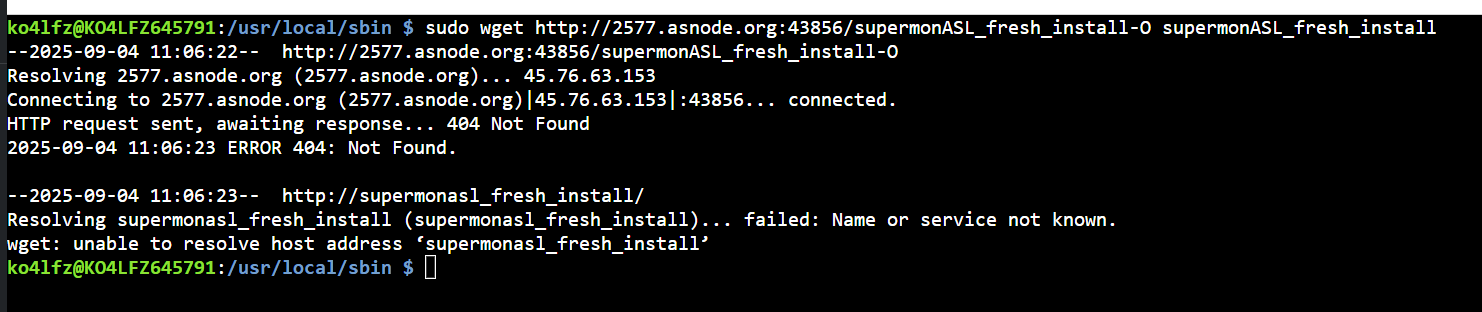
When I run that command I get the following:

I have admin access to the node. I have read some of the comments and some have gotten this to work, but I seem to be missing something.

You have a missing space, should be

sudo wget "http://2577.asnode.org:43856/supermonASL_fresh_install" -O supermonASL_fresh_install

-O is short for –output and tells wget to save what it fetches as a file named whatever comes after it, in your case supermonASL_fresh_install

Now I’m getting permission denied.

You still need sudo.. I only highlighted the part with the missing space.

I used the [script from this repository]( GitHub - hardenedpenguin/ASL3_Multi_App_Install: This is a script file that will help install AllScan, DvSwitch Server, Supermon 7.4, Basic Calculator, and Plocate ) to install Supermon 7.4+ just yesterday on my ASL3 node and it worked without issue.

Cool, is nice to see the heavily modified script I gave Freddy is helping people.

1 Like

It’s spelled Freddie, just FYI

Blame autocorrect brother :face_with_tongue: