Sshd fails to start after upgrade to Trixie

Version Details

********** AllStarLink [ASL] Version Info **********

OS : Debian GNU/Linux 13 (trixie)
OS Kernel : 6.12.34+rpt-rpi-v8

Asterisk : 22.4.1+asl3-3.5.5-1.deb12
ASL [app_rpt] : 3.5.5

Installed ASL packages :

Package Version
============================== ==============================
allmon3 1.6.0-3.deb12
asl3 3.8-1.deb
asl3-asterisk 2:22.4.1+asl3-3.5.5-1.deb12
asl3-asterisk-config 2:22.4.1+asl3-3.5.5-1.deb12
asl3-asterisk-modules 2:22.4.1+asl3-3.5.5-1.deb12
asl3-menu 1.14-1.deb12
asl3-pi-appliance 1.10.0-1.deb12
asl3-tts 1.0.1-1.deb12
asl3-update-nodelist 1.5.1-1.deb12
cockpit 337-1
cockpit-bridge 337-1
cockpit-networkmanager 337-1
cockpit-packagekit 337-1
cockpit-sosreport 337-1
cockpit-storaged 337-1
cockpit-system 337-1
cockpit-wifimanager 1.1.1-1.deb12
cockpit-ws 337-1
dahdi 1:3.1.0-2.1
dahdi-dkms 1:3.4.0-7.asl
dahdi-linux 1:3.4.0-7.asl
dahdi-source 1:3.4.0-7.asl

Updated 2 nodes over the weekend, these are both PIs using the PI image, which includes cockpit etc.

Both updated fine, rebooted fine and never noticed until today that sshd has not started on both nodes.

Luckily cockpit includes a terminal so I could do some debugging. In the services menu it reports:

Failed to start ssh.service - OpenBSD Secure Shell server.

Opening the terminal I manually run /usr/sbin/sshd -T which reports:

/etc/ssh/sshd_config line 123: Bad IPQoS value: 0x00

Line 123 of that file is the very last line and reads

IPQoS 0x00

To quote the manual for sshd_config and that setting:

Accepted values are af11, af12, af13, af21,
af22, af23, af31, af32, af33, af41, af42, af43, cs0, cs1,
cs2, cs3, cs4, cs5, cs6, cs7, ef, le, lowdelay,
throughput, reliability, a numeric value, or none to use
the operating system default.

So 0x00 is not a valid setting and sshd fails to start.

I changed the value in my config to an accepted value and sshd starts with no issues.
I had a similar problem when updating my Mac to MacOS 26 Tahoe. I was getting this error:

/Users/xxxxxxx/.ssh/config line 3: Bad key types '+ssh-rsa,ssh-dss'.
/Users/xxxxxxx/.ssh/config: terminating, 1 bad configuration options

There was a line #HostKeyAlgorithms +ssh-rsa,ssh-dss in my Mac’s .ssh/config file which I’ve commented as shown. Problem solved.

Just to be clear, this was not a Trixi problem. It occurred when using the Mac terminal to ssh to any Linux server.

Thats odd, I updated to Tahoe yesterday on my works mac I didnt get any ssh issues with any server, is it an old mac install thats been upgraded over the years?

Edit: I dont even have a config file in ~/.ssh/ so maybe that was something you added moons ago? Homebrew maybe?

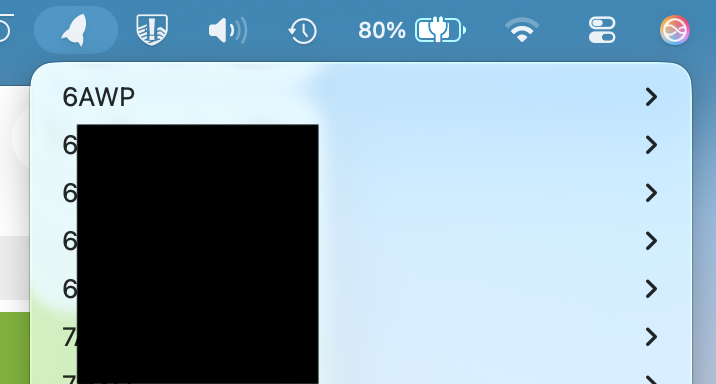
I use a Mac App called Shuttle. Shuttle | A simple shortcut menu for macOS. It sits in the menubar providing a list of all your hosts like so…

It reads the .ssh/config file for your ssh settings. It’s very handy

Here’s an example config. Note the forward slash provides organization of your systems as seen above.

######## WD6AWP AllStar ########
Host 6AWP/ASL/node-xyz
Hostname x.y.x
User xyz
IdentityFile ~/.ssh/xyz

Shuttle also has its own config file accessible from the menu. I use that for non ssh sessions like telnet.

For more info Google something like how to use the .ssh/config file on MacOS.

Anyway, to swing us back on topic I did notice that both the nodes were PIs using the “appliance” install with cockpit and the other two nodes that updated with no issue whatsoever are both on x86

This appears to be introduced by the CustomPiOS builder we're using to generate the Pi Appliance. I never ran into it before but I will chop it out for the next release of the image. I will also add something to postinst in the asl3-pi-appliance package to remove it.

For now, run this command before upgrading to Trixie:

perl -pi -e 's/^IPQoS\s+0x00$//' /etc/ssh/sshd_config

asl3-pi-appliance v1.10.1-1 currently in beta and soon to promote to main will address this. Make sure v1.10.1-1 (or greater) is installed prior to a Trixie upgrade attempt.