K5IJD
August 11, 2026, 3:34pm
1
saytime.pl file list.docx (6.7 KB)
ASL3 Node 640160 working normally except ...
This node is on Trixie and all updates up to date.
I installed KD5FMU's SAYTIME 2026.
Now, saytime.pl announces the correct time but then weather that is 3 weeks old.
I have researched and researched and I cannot find the source of the old weather report.
This is surely an ID10T error but I cant find it!
Attached is a word document with all the information that I could think of that might help a knowledgeable person help dig out the error.
If you need more info, let me know.
I am truly out of my depth on this and would really appreciate any help!
Thanks in advance.
K5IJDCHUCK
G5TOM
August 11, 2026, 5:47pm
2
Chuck,
What happens when you run show_weatherapi.sh. Is that report also out of date?
Likewise, when you go to Free Weather API - WeatherAPI.com and use the 'API Explorer' menu item with your key/zipcode. Is that report out of date?
Tom
K5IJD
August 12, 2026, 1:50am
3
Hi! Tom.
Thanks for the reply.
In both cases the weather is the current weather.
Thanks,
K5IJDCHUCK
Someone replied to your post.
G0JSV
Chuck,
What happens when you run show_weatherapi.sh. Is that report also out of date?
Likewise, when you go to Free Weather API - WeatherAPI.com and use the 'API Explorer' menu item with your key/zipcode. Is that report out of date?
Tom
···
On Tuesday, August 11, 2026 at 01:47:21 PM CDT, Tom [email protected]
Visit Topic or reply to this email to respond.
To unsubscribe from these emails, click here .
G5TOM
August 12, 2026, 11:47am
4
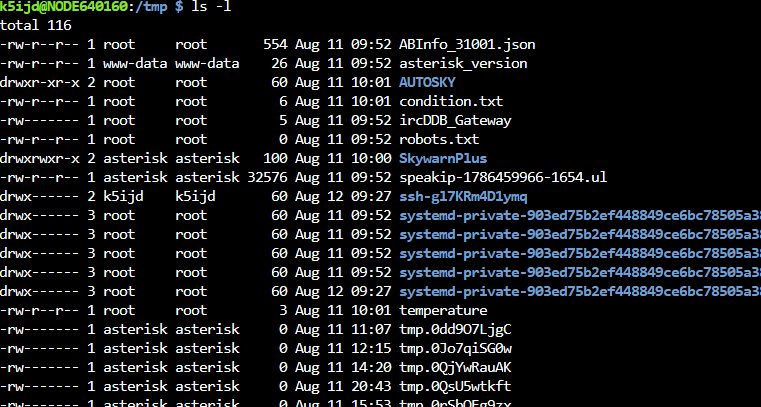
OK, next I would check the current.env file in /var/cache/asl3-saytime-weather. How does that look?
The saytime.pl file creates a temporary concatenated sound file (.gsm, .ulaw, *.ul) called current-time in the /tmp directory.. You will need to be quick because the file is deleted once read into memory and the contents announced. What is the timestamp of that file?
Tom.
K5IJD
August 12, 2026, 3:30pm
5
Tom:
So, it looks like the cached .env is not getting updated.
k5ijd@NODE640160:/var/cache $ ls -l
k5ijd@NODE640160:/var/cache/asl3-saytime-weather $ ls -l
Could not find the file current-time in the /tmp directory
K5IJDCHUCK
Someone replied to your post.
G0JSV
OK, next I would check the current.env file in /var/cache/asl3-saytime-weather. How does that look?
The saytime.pl file creates a temporary concatenated sound file (.gsm, .ulaw, *.ul) called current-time in the /tmp directory.. You will need to be quick because the file is deleted once read into memory and the contents announced. What is the timestamp of that file?
Tom.
···
On Wednesday, August 12, 2026 at 07:48:01 AM CDT, Tom [email protected]
Visit Topic or reply to this email to respond.
To unsubscribe from these emails, click here .
G5TOM
August 12, 2026, 7:13pm
6
Try running /usr/local/sbin/asl-weatherapi-update.sh manually. I sometimes times find 2 putty instances useful here. One to run the command and the second running the asterisk cli to catch any error messages. Then chech the cache file again.
Tom
K5IJD
August 13, 2026, 12:30pm
7
Tried to run it from the terminal but no such file...
k5ijd@NODE640160:~ $ ./usr/local/sbin/asl3-weatherapi-update.sh
k5ijd@NODE640160:~ $ sudo ./usr/local/sbin/asl3-weatherapi-update.sh
sudo: ./usr/local/sbin/asl3-weatherapi-update.sh: command not found
k5ijd@NODE640160:~ $ cd /usr/local/sbin/k5ijd@NODE640160:/usr/local/sbin $ ls
AMBEtest4_p3.py astdb.sh DVSwitch-startup logip platformDetect.sh saytime.pl show_weatherapi.sh supermonASL_latest_update
Not really sure what this is telling me. The file seems to be there but maybe not executable???
k5ijd@NODE640160:/usr/local/sbin $ ls -l
Again, thanks for all your help.
K5IJDCHUCK
Someone replied to your post.
G0JSV
Try running /usr/local/sbin/asl-weatherapi-update.sh manually. I sometimes times find 2 putty instances useful here. One to run the command and the second running the asterisk cli to catch any error messages. Then chech the cache file again.
Tom
···
On Wednesday, August 12, 2026 at 03:14:04 PM CDT, Tom [email protected]
Visit Topic or reply to this email to respond.
To unsubscribe from these emails, click here .
G5TOM
August 13, 2026, 6:57pm
8
Trying running sudo asl-menu. From the menu select option 2, 'Enter a bash shell as root'. Then change the current/working directory to /usr/local/sbin. Now while in this direcory try running the script again. First try asl-weatherapi-update.sh if that fails try ./asl-weatherapi-update.sh. According to the screenshot above, the file is present and has the executable flag set so it should run.
K5IJD
August 14, 2026, 12:47pm
9
Here are the results...
Note that there is an asl3-weatherapi.update but not a asl-weatherapi-update.
If I run the same commands using asl3-weatherapi-update, I get an open blank nano screen that says at the bottom "File /etc/asterisk/local/weatherapi.ini# is being edited by root (with nano 8.4, PID 2032); open anyway?"
No matter if you choose Y or N the screen wont close with Control C and just hangs there.
root@NODE640160:/usr/local/sbin# ./asl-weatherapi-update.sh
root@NODE640160:/usr/local/sbin# asl-weatherapi-update.sh
root@NODE640160:/usr/local/sbin# ls -l
Someone replied to your post.
G0JSV
Trying running sudo asl-menu. From the menu select option 2, 'Enter a bash shell as root'. Then change the current/working directory to /usr/local/sbin. Now while in this direcory try running the script again. First try asl-weatherapi-update.sh if that fails try ./asl-weatherapi-update.sh. According to the screenshot above, the file is present and has the executable flag set so it should run.
···
On Thursday, August 13, 2026 at 02:57:16 PM CDT, Tom [email protected]
Visit Topic or reply to this email to respond.
To unsubscribe from these emails, click here .
G5TOM
August 14, 2026, 3:04pm
10
Reboot to see if this clears the lock on the weatherspi.ini file.
sudo reboot now
K5IJD
August 14, 2026, 4:59pm
11
After "sudo reboot now" the lock on weatherapi.ini did not clear.
Someone replied to your post.
G0JSV
Reboot to see if this clears the lock on the weatherspi.ini file.
sudo reboot now
···
On Friday, August 14, 2026 at 11:04:19 AM CDT, Tom [email protected]
Visit Topic or reply to this email to respond.
To unsubscribe from these emails, click here .
 |
|