I have a remote connection from my ASL node (55311) to a HamVOIP node (541820) that disconnects at every integral of 5 minutes after the hour. Not every five minutes, but at exactly 3:05 or 3:10 or 3:15, etc. This ekes of a cron job but I’ve scoured both nodes and can find nothing. Maybe Asterisk has an internal scheduler that I’m not aware of?
I have another HamVOIP node (55310) that I connect to and it stays connected without problem.
I have a 20 second tcpdump packet capture to help in debugging, and the HamVOIP node sends two packets right after the interval:
I note the * wb-6! (invalid) but it also appears on packets from the other HamVOIP node, and on packets sent from this node when the connection is up and functioning properly.
Any hints about where to look for the source of the problem?
Thanks,
–Dave
Setup Information
OS : Debian GNU/Linux 12 (bookworm)
OS Kernel : 6.12.62+rpt-rpi-v8
Asterisk : 22.7.0+asl3-3.7.1-1.deb12
ASL [app_rpt] : 3.7.1
Tail of rpt_extnodes shows it is current:
;Generated 12796 records in 0.169 seconds.
;Generated at 2026-02-28 17:09:04 UTC by aws-east1a-portal0
Mike, thanks for the ideas. Generally the ASL3 node (55311) initiates the connection, but it goes away no matter which node it starts from.
The router in front of the ASL3 node has a cron feature but I verified it is disabled (thanks, hadn’t thought of that!). The router in front of the HamVOIP node is a consumer router and doesn’t have such. The HamVOIP node acts as a hub for several other nodes and they do not suffer the disconnects.
And thanks for the permanent connection idea, n6zcm. This page suggests a startup macro that I will set.
You may be running into a situation where the router infront of the problematic node has a broken or obnoxious state-tracking in its NAT implementation (I'm assuming NAT since you said "consumer router"). It may be losing the session state after a 300 second timer (a common choice in firewalls) and then it's being petulant about re-establishing the connection.
Problem solved! Long story short: it wasn’t ALS3 or HamVOIP at all, it was my network.
Many thanks to you, Mike, for getting me to revisit my network. Here’s the long story…
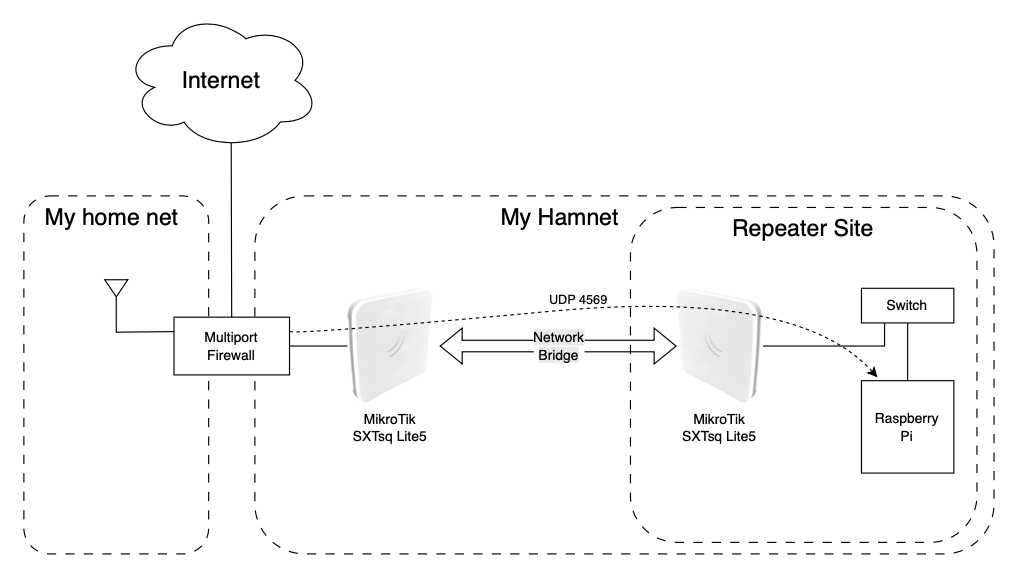
I’m using a pair of Mikrotik SXTsq Lite5 devices to make a wireless bridge to the node. It’s at my house right now, but I will be using it for a repeater link where there’s no Internet. I had assumed the bridge would be transparent and just send all packets back and forth. Never assume anything.
Your comment got me re-thinking things, and I started isolating the various bits of the network. When I replaced the wireless bridge with a cable, the connection stayed up. That got me Googling Mikrotik bridges and it turns out it runs RTSP (real-time spanning tree) at intervals to prevent routing loops. There are no loops in my setup so not sure why this was a problem, but disabling RTSP fixed the issue and my nodes remain connected in perpetuity.
So for future explorers who find this post by keyword, if you’re using a Mikrotik bridge, try disabling RTSP by issuing the following command on both sides of the bridge:
[admin@MikroTik] > /interface bridge set protocol-mode=none
Thanks again to Mike, NCZCM and N8EI for your speedy responses.
A word of networking caution.... If you were getting an RSTP block on a port inside of RouterOS then that implies you do, in fact, have a physical or logical MAC looping issue. RSTP is an almost-essential part of all Ethernet networking deployments. Of concern here is you had to set it on the pseudo-port "bridge" that sits across all the assigned interfaces. What you likely "fixed" was RSTP blocking the port because it was receiving BPDUs and perceiving a MAC loop. By disabling RSTP you removed the block and likely your network is 'riding out' the short-term loop for whatever is causing it. Both sides of an RouterOS-based device using the bridge pseudo-port are a multiport switch and behave accordingly.
I don’t see how a loop can exist. Even if the Raspberry Pi had WiFi enabled (it does not) that would connect to the home network and get an IP on another network and not constitute a loop.
I’m no network engineer so I accept that I could be wrong about this. Do you have suggestions about where I should look for evidence that there’s a loop?