Well Gervais,
You are in the right place for help with allstar and app-rpt.
What you do and how you do it is not entirely written in stone.
Lots of dependencies on what you have to work with and any site / hardware limitations.
Sp your first step is probably reading, and lots of it so you can make the right decisions for your install from the beginning.
This link may help get you started so you are asking the right questions anyway…
Since the last time I have responded to this same question, some time ago, a lot has changed.
Many flavors of computer hardware are supported including raspberry pi.
I don’t wish to advise you on what you should use but if I were you starting out, I think I would experiment a bit with a old PC running at 2ghz and 2gb ram
with the ACID software found at allstarlink.org
get to know the in’s and out’s before leaping into unfamiliar hardware that might add to the learning pain.
You might state to the group what you intend to do with the system… ie remote mountain repeater or wide area voted system
and perhaps someone will pick it up from there.
Anyway, this is the place to ask questions to your problems.
Plenty of guys read this daily.
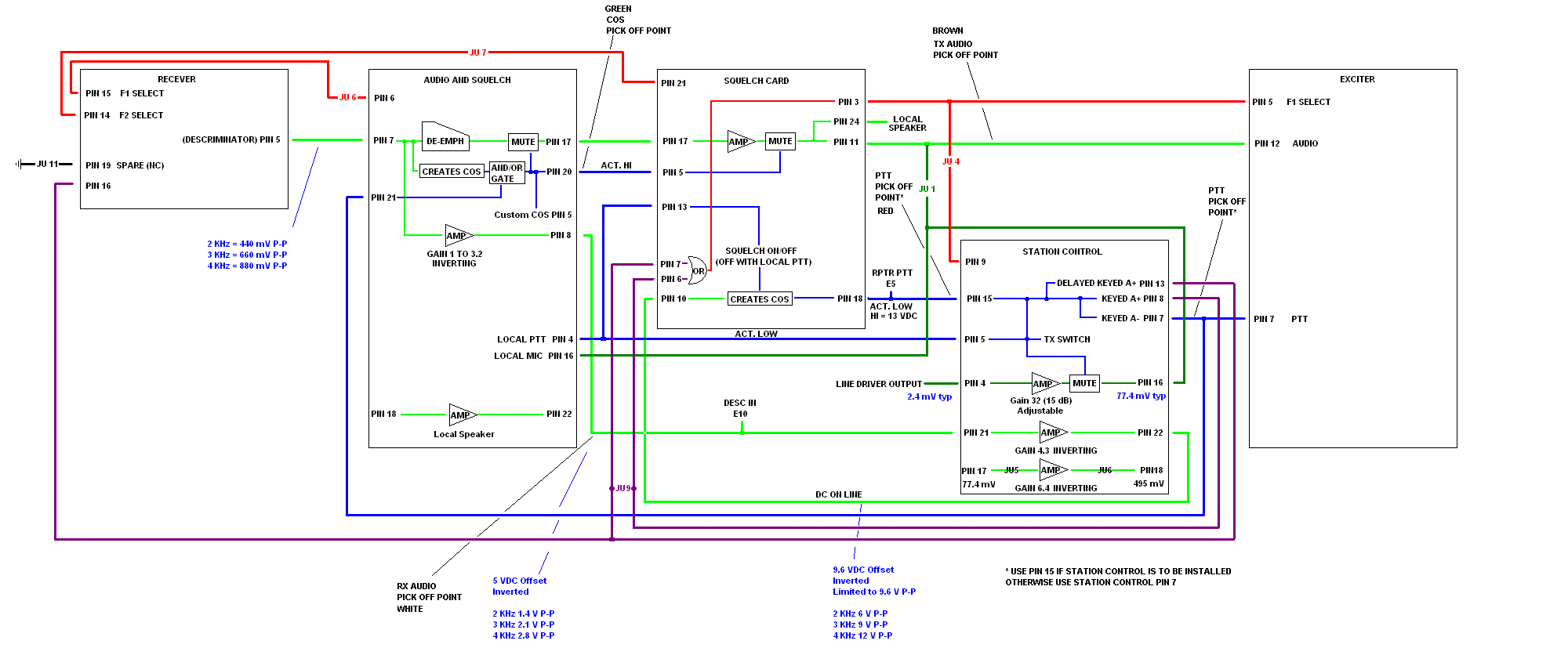
To interface it you’ll need to make a cable and solder it to some pick off points.
Attached is the drawing I made when wiring MSR2000’s to controllers.
All you need is an A&S (Audio and Squelch) card and a Station Control card. I don’t use the “squelch card”, as the squelch in the A&S card is superior.
I like pin 8 on the A&S card for discriminator audio, pin 17 for muted de-emphasised audio
Pin 20 on the A&S for COS (active hi). I typically soldered on a PNP transistor in the A&S card and pulled an open collector out to pin 5 for an active low COS line.
Tx audio is on pin 11 of the squelch card.
PTT (active low) is pin 7 of the Station Control Card.
You do not need a password to unsubscribe, you can do it via email confirmation. If you have trouble unsubscribing, please send a message to the list detailing the problem.