Local ip announce on bootup and dtmf

I’ve tried multiple suggestions found in the forums about configurations to have the node announce its “local” ip on bootup and dtmf.

I’ve followed suggestions and just can’t get it to work.

I have without a problem followed some suggestions on it announcing the “public” ip with no problems.

Does anyone have a working solution to this on for an allstarlink3 node?

Any help would be greatly appreciated. Thank You

2 Likes

The above youtube video is a very convoluted way to do this. There is a much simpler way.

I just set this up in about 1 minute. First, you want a general DTMF command to say the local IP. That can be done as described in other posts here, but to recap,

cd /etc/asterisk/
sudo nano rpt.conf
Add following line if not already present, under ‘Autopatch Commands’ section:
69 = autopatchup,context=my-ip,noct=1,farenddisconnect=1,dialtime=9000,quiet=1

sudo nano extensions.conf
Add following lines if not already present, under [my-ip] section:
; *690: Say LAN IP Address
exten => 0,1,AGI(getip.sh)
exten => 0,n,Wait(1)
exten => 0,n,SayAlpha(${result})
exten => 0,n,Hangup

sudo nano /usr/share/asterisk/agi-bin/getip.sh
Add below lines:
#!/bin/bash
echo SET VARIABLE result ``hostname -I`

NOTE: This forum software has issues showing backtick characters. The “hostname -I” above should have one backtick character before and after it.

sudo chmod 775 /usr/share/asterisk/agi-bin/getip.sh

sudo nano modules.conf
Update following lines:
load => res_agi.so
load => res_speech.so

Now restart Asterisk and confirm DTMF command *690 says the LAN IP address.

sudo nano rpt.conf
Add the following line:
startup_macro = *690

Now reboot the node and confirm it says the LAN IP address.

Might not work if there is a delay in the OS getting an IP address assignment and there are some ways around that possible issue but for now the above works for me.

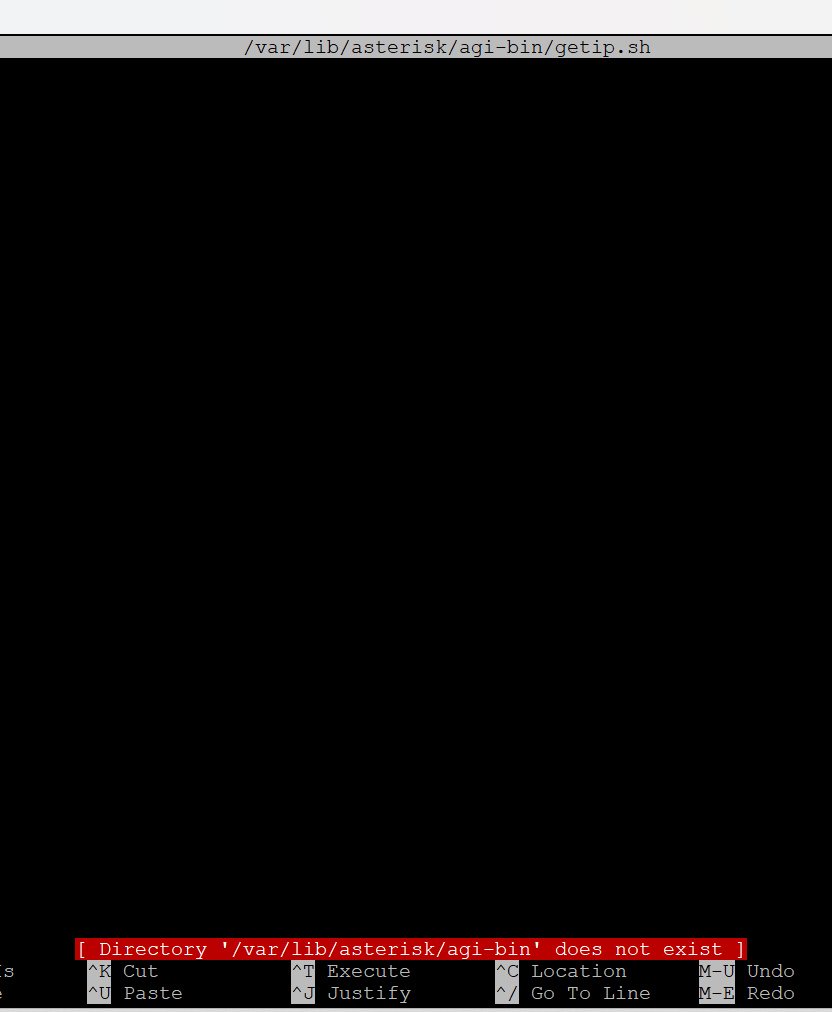
Thanks! don’t know why but i can’t get by the sudo nano /var/lib/asterisk/agi-bin/getip.sh with this method.

this is on a 3080 and tried on a few of them.

Ok…this worked perfectly. really appreciate it.

It appears that /usr/share/asterisk/agi-bin/ is actually where you want to put AGI files, not /var/lib/asterisk/agi-bin/. Not sure where the latter came from, that may have been for ASL2. Will update my above comment with this correction.

1 Like

Not sure why you want to route to an agi and shell script when you are in the dialplan and only need to take action there.

Skinny

69=autopatchup,context=my-ip,noct=1,farenddisconnect=1,dialtime=9000,quiet=1,exten=00
[my-ip]
exten=00,1,Set(MYADDR=${CURL(https://api.ipify.org?format=json)})
exten=00,2,Wait,1
exten=00,3,SayAlpha(${MYADDR})
exten=00,n,Hangup

No AGI or Bash Shell required.
At least that has worked for me the last 10 years+ despite some of these external services for it disappearing. You just have to impose a new one in the curl address when it happens…
To each his own but this is the skinny. But I never tested it under v3 and you do have to have curl installed to retrieve it.
*69 reads ip
I use something a bit different for telephone (sip) use with more data.

Hi Mike, how do you execute a local shell command solely from within the dialplan eg. ‘hostname -I’? Your example above uses curl but that will not retrieve the LAN IP.

You are correct. That is the wan ip I posted. Sorry, did not notice LAN.

But to execute a shell command from withing the dialplan,
you need to use :

System()

But, you need a returned value for the shell script for your next step and

Shell() is the right animal if used correctly.

exten => 1234,1,Set(result=${shell(/path/script.sh)}) 
exten => 1234,2,Verbose(result is: ${result})

This works with modern versions of asterisk.
But my syntax may be off for v20 ??

ip addr list | sed -En 's/127.0.0.1//;s/.*inet (addr:)?(([0-9]*\.){3}[0-9]*).*/\2/p' is a one-liner to get (all) local IPs.

1 Like

So that looks like this…

exten=00,1,Set(MYLAN=${shell(ip addr list | sed -En 's/127.0.0.1//;s/.*inet (addr:)?(([0-9]*\.){3}[0-9]*).*/\2/p')}) 

exten=00,2,SayAlpha(${MYLAN})

unless i goofed

1 Like

Just a final note on Shell()

If you try this with older asl/asterisk versions, it will not function.
Much to my dismay for many years.
It was added later in v 1.8/10/11 ??
And to watch feeding your Shell() script/command options that contain a linefeed char.

And I did not try this with asl3, but if anyone does, please mention it works as written, or what you had to do to make it work for others reference.

Mike, Shell() does not work in extensions.conf, gives a ‘Function not registered’ error. There is a way it can be enabled but it is considered a security risk and requires a change to asterisk.conf. So I’d say it’s a lot cleaner to use AGI() as described above.

1 Like

Being that we are totally outside of the scope of the intended thread already and to answer that with a final comment,
That is because of the potential for command injection. It must be litigated as with so many other security potentials. It assumes a non-auth user has entered your system.
Considering the average person don’t properly firewall or limit their their sip ports, yea, it probably is not for everyone. I have had no issues with it in versions of asterisk without app_rpt in 10 years it was introduced. I don’t live in a rubber room.

This topic was automatically closed 3 days after the last reply. New replies are no longer allowed.