Hi there- just updated 2 ASL3 nodes to v0.83 and lost my favs. Is there a way to restore? I had a pretty long customized list going. Thx.
When you upgrade AllScan, the existing dir is moved to ./allscan.bak.[old-ver#]/, the new version is then downloaded, and any .ini files in the backup dir then copied into the new folder. Thus any local favorites.ini file will be backed up and copied to the new version. Other favorites.ini search locations outside of the allscan web folder have not changed.
Try running ‘sudo find / -name favorites.ini -print’ and let me know the output. That will show where you have copies of the file and where it can be restored from, and might be helpful in clarifying why the file might not be showing up as expected.
I found it and restored it!
/var/www/html/allscan.bak.0.77/favorites.ini
No other copies shown but didn’t seem to copy from bak to new version directory.
Thanks David I am grateful for your great Linux command skills etc.
New install- can’t login- ok prob user error- deleted dir, ran update/install again- still seems to want an existing login. Can you tell me where/how do I delete/reset the login credentials manually? Thank you.
You can delete all settings by running ‘sudo rm -rf /etc/allscan’.
David- thank you for whatever you have been improving in the code. I have a friend’s node I built Pi4 and ASL3 and had issue w Allscan I could not solve. Some similar error screen cannot parse allmon3 something or other. I just did an allscan update for the heck of it-
root@ASL62028:/home/kf6bm# cd ~
root@ASL62028:~# ./AllScanInstallUpdate.php
and all was fixed and working! Was just v0.87 to v0.88 but seeing it fix itself was a relief and pleasant surprise. Thx.
Info- Upgraded to v0.89 and lost favs again- was left w only sample favs. Copied from v0.88 backup.
Hi Clifford, Please copy all messages shown in the log window here or email to me.
emailed you thx (2 out of 3 updates from v0.89 to v0.92 reverted to samples only, one kept orig faves and also samples)
Clifford, You are not following the update instructions on the AllScan github page. As a result you are instead using very old versions of the update script. ie. from your log:
root@ASL48654:/home/kk6qms# cd ~
root@ASL48654:~# sudo ./AllScanInstallUpdate.php
AllScan Installer/Updater Version: v1.19
The current version of the install/update script is 1.26. You have 1.19 which is probably over a year out-of-date. Be sure to always follow the instructions exactly as listed on the github page, which currently are:
sudo apt update; sudo apt install php php-sqlite3 php-curl unzip avahi-daemon asl3-tts -y
cd ~
rm AllScanInstallUpdate.php 2> /dev/null
wget 'https://raw.githubusercontent.com/davidgsd/AllScan/main/AllScanInstallUpdate.php'
chmod 755 AllScanInstallUpdate.php
sudo ./AllScanInstallUpdate.php
Fortunately as I mentioned you can recover any favorites files from the backup folder created whenever an update is done. If you do a cd /var/www/html; ls -lrt */*.ini you'll see all the backup files and can then copy those into the allscan/ folder.
Hi-
REQ- edit favs info or swap a field or add field for user notes for ex:(this node has 60s net tes/wed)
issue:
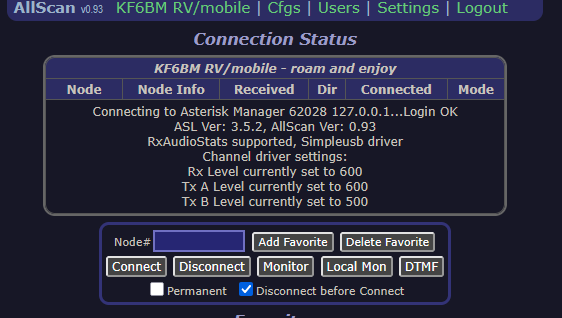
New node ASL3 up to date and Pi4- working good- tried diff browsers, clear cache- but when connected via DVSwitch and iaxclient the connection area shows:
Connection Status
KF6BM RV/mobile - roam and enjoy
Node Node Info Received Dir Connected Mode
Connecting to Asterisk Manager 62028 127.0.0.1...Login OK
ASL Ver: 3.5.2, AllScan Ver: 0.89
"Thou Shalt Not Clip The ADC" - The 1st Law of AllStar
RxAudioStats supported, Simpleusb driver
Channel driver settings:
Rx Level currently set to 600
Tx A Level currently set to 600
Tx B Level currently set to 500
Hi Clifford,
You can manually edit the favorites.ini file to add custom text. The Cfgs tab now supports easy downloading and uploading of favorites files thus it is now very easy to download the file, edit it however you like in a text editor and upload it. I will likely at some point add some editing capabilities in the AllScan GUI also but it may be awhile until that's implemented.
Re. an issue, you list some messages from the log window, but I don't see any errors there, so you'll have to clarify what the issue is. And you're running an old version so be sure to update to the latest version first.
Thx. It does not show node number and connections just all that text.
Clifford, you didn't list all the messages in the log window. It will say there what files the AMI configs were read from. And as I mentioned you don't have the current version of AllScan installed. As stated on the github page, you should always update to the latest version before submitting any tech support request. When you do an update, not only is AllScan itself updated but the installer also checks the file system and will validate the config file locations and permissions. Last, please do not use this thread or the ASL forum for AllScan tech support questions. Tech support questions should be emailed to me. Thank you.
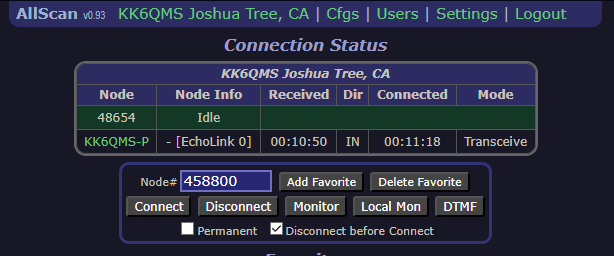
Hi David- I didn't say there was an error- and I never mentioned the log window bc that is not the area of concern. This is not the same error I have had 5 times before with favorites/database/cfg issues. I just posted the info that appears in the connection area when connected via DVSwitch- a screenshot will illustrate more clearly- see below. (1st screenshot is identical ASL3 node w DVSwitch connected, and 2nd screenshot is node w issue where the connection area gets replaced w box filled w log info. Both nodes using same iax-client stanza and extensions files same too. Both are running latest allscan as well. (IMO a forum is a great place for support at least it is searchable and available for other users but I'll be sure and email you in future thx.)
....and I found the issue but is new/odd. I have always added lower case "ph" in caller id in DVSwitch to easily identify phone in allmon etc. so= "KK6QMSph" for example. Now it seems if you append the lower case letters you get the issue shown in screenshot 2. I was comparing the 2 nodes/dvswitch cfgs and tried removing the "ph" and the issue went away and connection area in allscan works normally. (Not sure why node info shows echolink but don't care either. As long as users can connect w dvswitch and still have allscan working normally I'm satisfied.)
Hi Clifford, glad you got it working. I do not use DVSwitch (I'm not a fan of the robotic sounding audio of the low-bitrate digital radio modes), and thus AllScan was not set up to support it and I've done no testing with it. Issues relating to DVSwitch would probably be better suited to the DVSwitch forum than the ASL forum. There may be a DVSwitch developer who could be of more help and maybe even submit a Pull Request to update AllScan so it better supports DVSwitch node configurations and features. Thanks, David