Callsign-Based Usernames is Required
The Community Forum is now requiring that all members use their amateur radio callsign as their "username". Besides providing a uniform way to identify users, it is laying the groundwork for future plans to unify all AllStarLink services around a single account shared amongst all services.
New users will be required to set their username to their callsign at sign-up.
Existing users will be required to complete this process within the next 5-7 days.
How will this impact you?
Once the callsign field is changed to mandatory, on your next page load or login to the Community Forum you will be prompted to enter your Amateur Radio Callsign on your profile's preferences page. Once this is entered, your username will be changed automatically to your callsign. Additionally, a task will start to update any posts with your new username and will change any @-references in posts to your callsign-based username. This will take a few minutes to appear on the site.
Can I do it now?
Yes! If you want to set this now to control when you are prompted, you may do so in the following way:
-
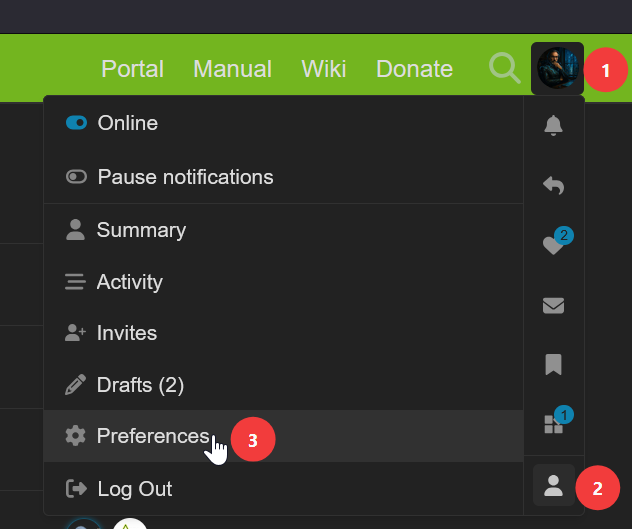
Click on your Avatar in the top-right corner. If you did not upload a picture, it will be a circle with the first letter of your current username. Then click on the little person icon and then Preferences.
-
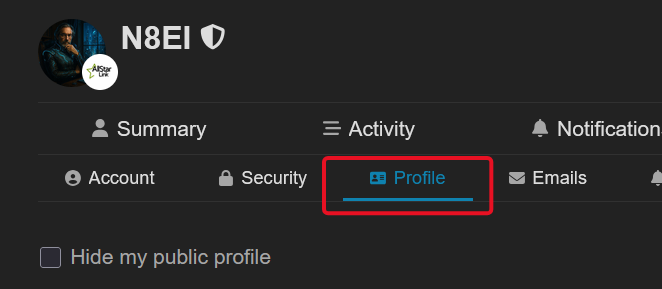
From your Preferences page that will appear, click on Profile
-
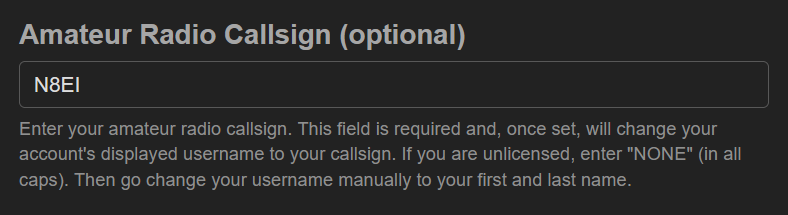
Scroll down to the field Amateur Radio License and enter your callsign.
-
Scroll to the bottom of the page and click Save Changes. You will be immediately redirected to the main page of the Community Forum to reset your preference URLs to your new callsign-based username.
What if my callsign changes?
You will be able to change your Amateur Radio Callsign once every 30 days. If your callsign changes, simply repeat the above steps and set your new callsign.
What if I have multiple callsigns?
Use the one that is registered with www.allstarlink.org.