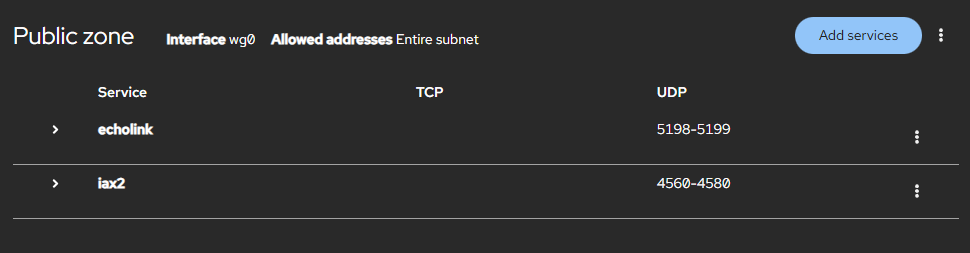
I have recently added a second Allstar/Echolink node. Because Echolink only allows 1 connection per public IP address I have utilized a 44net tunnel for the second node. This is working very well, however since it bypasses my home router/firewall rules the node is wide open to the internet. Obviously that’s not okay. I would like to restrict internet access to the node to only the ports required for Allstar and Echolink.
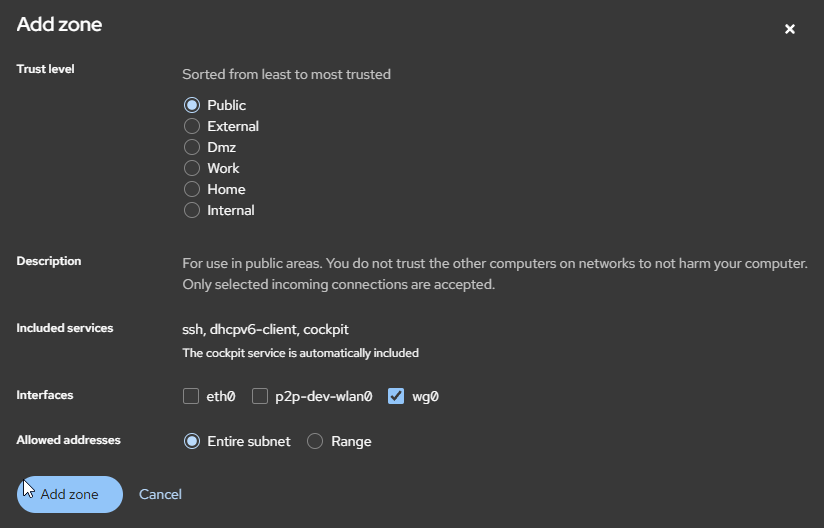
I’ve been studying the firewalld manuals but I’m not clear on how to lock down the specific interface to only a few TCP and UDP ports. It looks like I need to create a new “zone” which contains the wg0 interface but I’m getting lost after that. Is there a better or easier way to accomplish this? Linux is fairly new to me and I’m struggling to wrap my head around this.
Here is the output from “IP ADDR”
1: lo: <LOOPBACK,UP,LOWER_UP> mtu 65536 qdisc noqueue state UNKNOWN group default qlen 1000
link/loopback 00:00:00:00:00:00 brd 00:00:00:00:00:00
inet 127.0.0.1/8 scope host lo
valid_lft forever preferred_lft forever
inet6 ::1/128 scope host noprefixroute
valid_lft forever preferred_lft forever
2: eth0: <BROADCAST,MULTICAST,UP,LOWER_UP> mtu 1500 qdisc fq_codel state UP group default qlen 1000
link/ether b8:27:eb:d1:34:2d brd ff:ff:ff:ff:ff:ff
inet 192.168.1.39/24 brd 192.168.1.255 scope global dynamic noprefixroute eth0
valid_lft 29638sec preferred_lft 29638sec
inet6 fe80::9374:bc0e:13a9:f561/64 scope link noprefixroute
valid_lft forever preferred_lft forever
3: wlan0: <BROADCAST,MULTICAST> mtu 1500 qdisc noop state DOWN group default qlen 1000
link/ether b8:27:eb:84:61:78 brd ff:ff:ff:ff:ff:ff
4: wg0: <POINTOPOINT,NOARP,UP,LOWER_UP> mtu 1380 qdisc noqueue state UNKNOWN group default qlen 1000
link/none
inet 44.27.xxx.xxx/32 scope global wg0
valid_lft forever preferred_lft forever.
(last two octets of public address redacted until I sort this out).
The bottom line is that I want to keep local access as it is but lock down the public 44.27….. address. Am I overthinking this? Is there a better approach?
Any suggestions from those more familiar with this situation would be greatly appreciated!
David