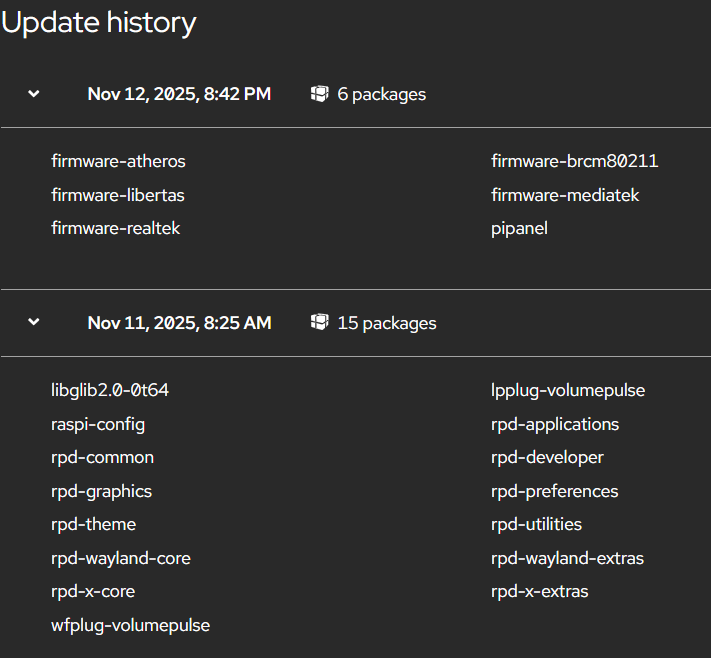
It looks like 620304 has registered but 620301 has NOT registered. I would suggest checking the logs on the latter. You can also try exec'ing /usr/bin/asl-check-install and/or /usr/bin/asl-dahdi-repair.
[2025-11-11 07:24:43.730] ERROR[13460] chan_simpleusb.c: Channel 1999: Is not able to detach the USB device
[2025-11-11 07:24:45.635] Asterisk 22.5.2+asl3-3.6.2-1.deb13 built by builder @ allstarlink.org on a aarch64 running Linux on 2025-10-31 14:09:57 UTC
[2025-11-11 07:24:45.983] ERROR[14065] chan_simpleusb.c: Channel 620301: Is not able to detach the USB device
[2025-11-13 06:33:55.139] Asterisk 22.5.2+asl3-3.6.2-1.deb13 built by builder @ allstarlink.org on a aarch64 running Linux on 2025-10-31 14:09:57 UTC
[2025-11-13 06:33:58.208] ERROR[1802] chan_simpleusb.c: Channel 620301: Unable to open DSP device 2: Device or resource busy.
The output above is a snippit if it.
2nd command didn’t output anything.
All worked and connected just fine till the update last night and when I got into the office this morning, I could not connect to anything. I can still tx/rx on my HT to the HSR-USB
What else can I try?
I was wrong on 620304, it works. forgot I was trying to connect from 620301. Strange thing is I can see the node with ssh and supermon….even remotely.
So, you've just got the 1 node (620301) that's not behaving ... and that's the node showing the "Is not able to detach the USB device" errors. This kinda sounds like there's something not yet setup correctly.
Q? how did you get Trixie installed on this system? Was this an upgrade from Bookworm? or did you start with Trixie and add the available ASL3 "beta" packages?
Know that we have Trixie on our TODO list. But, as we've posted before, the available packages are still at the "beta" level.
Here is is, no clue what it all means. Thx for the assist
root@node620301:~# lsof /dev/dsp
lsof: WARNING: can't stat() fuse.gvfsd-fuse file system /run/user/1000/gvfs
Output information may be incomplete.
lsof: WARNING: can't stat() fuse.portal file system /run/user/1000/doc
Output information may be incomplete.
root@node620301:~#
This was the same problem I posted about last week. Mine ended up being my URI changed ports after the upgrade. I had to manually find the new dvice port and change it in simpleusb.conf.
Here is what I posted as the fix for my node. My guess is the port information for the radio changed because of the OS upgrade. Also check the node log file to see what errors are showing up. I put my log in Gemini and it help point me in the right direction.
I have found a resolution! For some reason, when the system finished its reboot after the update, it changed the URI port assignment in the system configuration.
The fix was straightforward:
Find the new URI device path: Run the command:
Bash
ls -l /dev/usb/
This displayed the URI device and port information, showing the new path.
Update the Allstarlink configuration: Edit the /etc/asterisk/simpleusb.conf file to reflect the correct device path for the node. (e.g., changing device = /dev/usb/hiddev0 to the new path found in step 1.)
Restart Asterisk: Apply the changes by restarting the Asterisk service:
Bash
sudo systemctl restart asterisk
After these steps, the URI's heartbeat resumed, and the node is working again! Hope this helps anyone else encountering similar issues after a major kernel or firmware update on a Raspberry Pi running Allstarlink.