Setup Information
********** AllStarLink [ASL] Version Info **********

OS            : Debian GNU/Linux 13 (trixie)
OS Kernel     : 6.12.74+deb13+1-amd64

Asterisk      : 22.7.0+asl3-3.7.1-1.deb13
ASL [app_rpt] : 3.7.1

Installed ASL packages :

Package                         Version
==============================  ==============================
allmon3                         1.7.0-1.deb13
asl3                            3.15-1.deb13
asl3-appliance                  2.1.0-2.deb13
asl3-asterisk                   2:22.7.0+asl3-3.7.1-1.deb13
asl3-asterisk-config            2:22.7.0+asl3-3.7.1-1.deb13
asl3-asterisk-modules           2:22.7.0+asl3-3.7.1-1.deb13
asl3-menu                       1.16-1.deb13
asl3-tts                        1.0.1-1.deb13
asl3-update-nodelist            2.0.0-1.deb13
asl-apt-repos                   2.0-1.deb13
cockpit                         337-1
cockpit-bridge                  337-1
cockpit-networkmanager          337-1
cockpit-packagekit              337-1
cockpit-sosreport               337-1
cockpit-storaged                337-1
cockpit-system                  337-1
cockpit-wifimanager             1.2.0-1.deb13
cockpit-ws                      337-1
dahdi                           1:3.1.0-2.1
dahdi-dkms                      1:3.4.0-10.asl.deb13
dahdi-linux                     1:3.4.0-10.asl.deb13
dahdi-source                    1:3.4.0-10.asl.deb13
Using the default nodenames directory.
Inquiry
My node num: 68510
What: I’m trying to setup a custom nodename announcement per the documentation under Sound Files but I’m unable to successfully get it working.
Steps taken:
- Created & exported file with following settings via Audacity
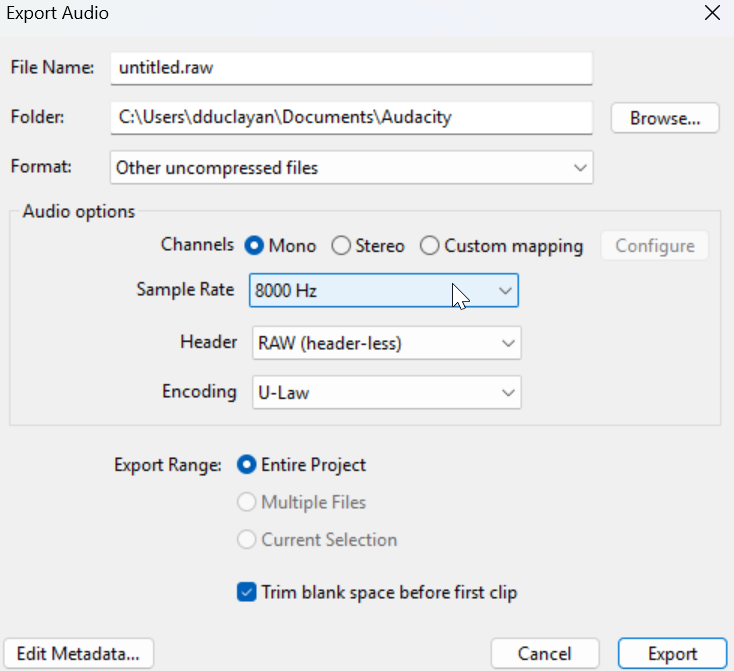
- Moved the file over to my pc running allstar. \
- Renamed file to 68510.ulaw and moved the file over to
/rpt/nodenames-
$ sudo mv 68510.ulaw /usr/share/asterisk/sounds/en/rpt/nodenames/
-
- Restart asterisk
- Connect to node via repeaterphone app, node still plays default TTS announcement
Expected:
- Expected to hear my custom sound file when connecting to the node