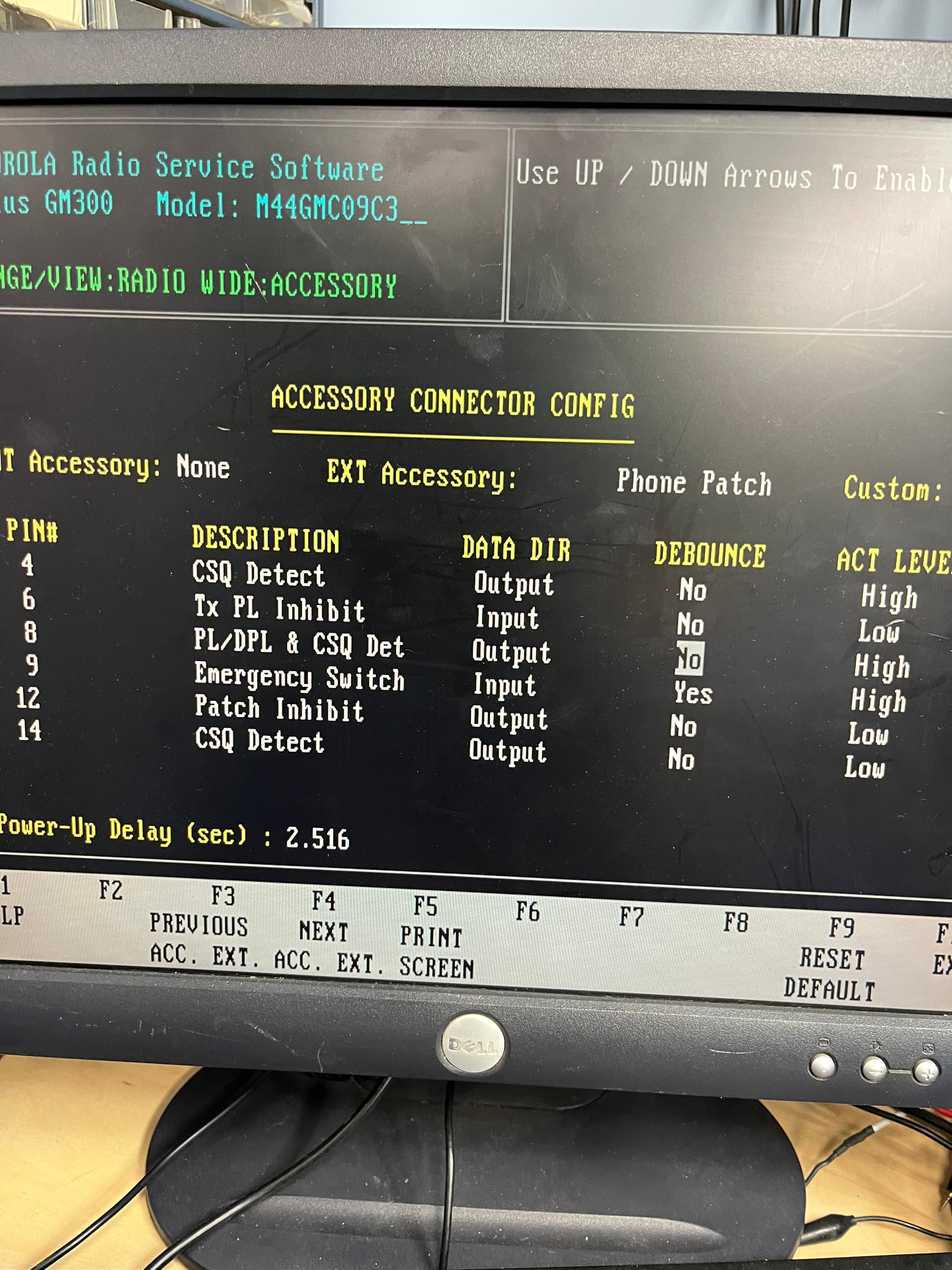
Any thoughts on what I am doing wrong ?
I have a :
OS : Debian GNU/Linux 13 (trixie)
OS Kernel : 6.12.62+rpt-rpi-v8
Asterisk : 22.7.0+asl3-3.7.1-1.deb13
ASL [app_rpt] : 3.7.1
the sound card is modified as per How to Modify A CM108 Sound Fob For Allstar 2. - allstar setup.com
I have a Motorola gm300 no matter what config i do i can’t get the radio to ptt the sound card i get receive from the sound card to the radio , i cant get an out ptt /core , the voltage are correct from the gm300 here is how the config is setup and i tried multiple confg and still not working
GM300 cor is active low (it does not change if i go active high)
the following is what i have for sound card configuration
I have included both the simplusb and the usbradio file below
here is the simpelusb.config:
;! Automatically generated configuration file
;! Filename: simpleusb.conf (/etc/asterisk/simpleusb.conf)
;! Generator: chan_simpleusb
;! Creation Date: Sat Jan 31 12:19:07 2026
;!
;***************************************************
;******** Template-tized simpleusb.conf ********
;***************************************************
; Note to editors: set tabs to 4 space characters. No wrap to keep comments neat.
; vim: tabstop=4
;
; SimpleUSB channel driver Configuration File
;
; See simpleusb.conf - AllStarLink Manual for full option documentation.
;
;;;;; New to ASL3 ;;;;;
;;;;; The SimpleUSB "tune" settings have moved to ;;;;;
;;;;; this file. The simpleusb_tune_usb_1999.conf ;;;;;
;;;;; file is no longer used. ;;;;;
; If you are going to use this channel driver, you MUST enable it in modules.conf
; change:
; noload => chan_simpleusb.so ; CM1xx USB Cards with Radio Interface Channel Driver (No DSP)
; noload => res_usbradio.so ; Required for both simpleusb and usbradio
; to:
; load => chan_simpleusb.so ; CM1xx USB Cards with Radio Interface Channel Driver (No DSP)
; load => res_usbradio.so ; Required for both simpleusb and usbradio
[general]
;------------------------------ JITTER BUFFER CONFIGURATION --------------------------
; jbenable = yes ; Enables the use of a jitterbuffer on the receiving side of an
; simpleusb channel. Defaults to "no". An enabled jitterbuffer will
; be used only if the sending side can create and the receiving
; side can not accept jitter. The simpleusb channel can't accept jitter,
; thus an enabled jitterbuffer on the receive simpleusb side will always
; be used if the sending side can create jitter.
; jbmaxsize = 200 ; Max length of the jitterbuffer in milliseconds.
; jbresyncthreshold = 1000 ; Jump in the frame timestamps over which the jitterbuffer is
; resynchronized. Useful to improve the quality of the voice, with
; big jumps in/broken timestamps, usually sent from exotic devices
; and programs. Defaults to 1000.
; jbimpl = fixed ; Jitterbuffer implementation, used on the receiving side of an simpleusb
; channel. Two implementations are currently available - "fixed"
; (with size always equals to jbmax-size) and "adaptive" (with
; variable size, actually the new jb of IAX2). Defaults to fixed.
; jblog = no ; Enables jitterbuffer frame logging. Defaults to "no".
;-----------------------------------------------------------------------------------
node-main
;;;;;;;;;;;;;;;;;;;;;;;;;;;;;;;;;;;;;;;;;;;;;;;;;
;;;;; Template for all your SimpleUSB nodes ;;;;;
;;;;;;;;;;;;;;;;;;;;;;;;;;;;;;;;;;;;;;;;;;;;;;;;;
eeprom = 0 ; EEPROM installed: 0,1
; 0 = no (radio interface does not have an EEPROM)
; 1 = yes (default)
hdwtype = 0 ; Leave this set to 0 for USB sound fobs designed for app_rpt
; or modified cmxxx sound fobs.
; 1 is for Dingotel/Sph interfaces.
; 2 is for NHC interfaces.
; 3 is for a custom interface.
; Receiver parameters
rxboost = no ; no = 20db attenuator inserted, yes = 20db attenuator removed
; Set to yes for additional gain if using a low-level receiver output
; CM119B devices are hard coded to rxboost 20dB attenuator removed
carrierfrom = usbinvert ; no,usb,usbinvert
; no - no carrier detection at all
; usb - from the COR line on the USB sound fob (Active high)
; usbinvert - from the inverted COR line on the USB sound fob (Active low)
; pp - from parallel port (Active high)
; ppinvert - from the inverted parallel port (Active low)
ctcssfrom = no ; no,usb,usbinvert
; no - CTCSS decoding, system will be carrier squelch
; usb - CTCSS decoding using input from USB sound fob (Active high)
; usbinvert - from the inverted CTCSS line on the USB sound fob (Active low)
; pp - from parallel port (Active high)
; ppinvert - from the inverted parallel port (Active low)
deemphasis = no ; enable de-emphasis (input from discriminator)
plfilter = yes ; enable PL filter
rxondelay = 0 ; Number of 20ms audio frames to delay after the hardware COR goes active,
; before the signal is considered valid and COR is asserted to app_rpt.
; before the signal is considered valid and COR is asserted to app_rpt.
; If txoffdelay is also set (non-zero), then the transmitter has to be off
; for txoffdelay AND COR has to be active for rxondelay before COR is
; asserted to app_rpt. The default is 0. Use this ONLY on simplex nodes,
; to eliminate "Ping Ponging". Leave commented out for repeaters or
; other full duplex nodes.
txoffdelay = 0 ; Number of 20ms audio frames the transmitter has to be un-keyed before a
; hardware COR signal is considered valid, and COR is asserted to app_rpt.
; If rxondelay is also set (non-zero), then the transmitter has to be off
; for txoffdelay AND COR has to be active for rxondelay before COR is
; asserted to app_rpt. The default is 0. Leave commented out for normal
; repeaters or other full duplex nodes.
; This is useful when setting up a half-duplex link with an existing
; repeater, where you need to ignore the repeater's hangtime.
; Transmitter parameters
invertptt = no ; Invert PTT: no,yes
; no - ground to transmit
; yes - open to transmit
preemphasis = no ; Perform standard 6db/octave pre-emphasis
; pager = no ; no,a,b (e.g. pager = b means "put the normal repeat audio on channel A, and the pager audio on channel B")
; duplex3 = 0 ; duplex 3 gain setting (0 to disable)
clipledgpio = 0 ; Enable ADC Clip Detect feature to use a GPIO output (0 to disable).
; Supports URI Clip LED by setting a GPIO (if available) high for 500mS
; when clipping detected. Value = GPIO# to use (GPIO1 recommended)
legacyaudioscaling = no ; If yes, continue to do raw audio sample scaling and clipping, resulting in Tx audio levels increasing
;;; End of node-main template
#tryinclude "custom/simpleusb.conf"
#tryinclude "custom/simpleusb/*.conf"
;;;;;;;;;;;;;;;;;;;;;;;;;;;;;;;;;;;;;;;;;;;;;;;;;;;;;;;;;;;
;;;;;;;;;;;;;;;; Configure your nodes here ;;;;;;;;;;;;;;;;
;;;;;;;;;;;;;;;;;;;;;;;;;;;;;;;;;;;;;;;;;;;;;;;;;;;;;;;;;;;
;
; Note: there is no need to duplicate entire settings. Only
; place settings that are different than the template.
;
; Note: the device string is automatically found when the
; USB setting "devstr=" is empty.
;
; Note: the interface "tune" settings will be added to the
; per-node settings (below).
;;;;; ASL3 Tune settings ;;;;;
devstr =
rxmixerset = 500
txmixaset = 500
txmixbset = 500
ctcssfrom = no
Usbradio.conf:
GNU nano 8.4 /etc/asterisk/usbradio.conf
;**************************************************
;******** Template-tized usbradio.conf ********
;**************************************************
; Note to editors: set tabs to 4 space characters. No wrap to keep comments neat.
; vim: tabstop=4
;
; USBRadio channel driver Configuration File
;
;;;;; New to ASL3 ;;;;;
;;;;; The USBRadio "tune" settings have moved to ;;;;;
;;;;; this file. The usbradio_tune_usb_1999.conf ;;;;;
;;;;; file is no longer used. ;;;;;
; If you are going to use this channel driver, you MUST enable it in modules.conf
; noload => chan_usbradio.so ; CM1xx USB Cards with Radio Interface Channel Driver (DSP)
; noload => res_usbradio.so ; Required for both simpleusb and usbradio
; to:
; load => chan_usbradio.so ; CM1xx USB Cards with Radio Interface Channel Driver (DSP)
; load => res_usbradio.so ; Required for both simpleusb and usbradio
[general]
;------------------------------ JITTER BUFFER CONFIGURATION --------------------------
; jbenable = yes ; Enables the use of a jitterbuffer on the receiving side of an
; USBRADIO channel. Defaults to "no". An enabled jitterbuffer will
; be used only if the sending side can create and the receiving
; side can not accept jitter. The USBRADIO channel can't accept jitter,
; thus an enabled jitterbuffer on the receive USBRADIO side will always
; be used if the sending side can create jitter.
; jbmaxsize = 200 ; Max length of the jitterbuffer in milliseconds.
; jbresyncthreshold = 1000 ; Jump in the frame timestamps over which the jitterbuffer is
; resynchronized. Useful to improve the quality of the voice, with
; big jumps in/broken timestamps, usually sent from exotic devices
; and programs. Defaults to 1000.
; jbimpl = fixed ; Jitterbuffer implementation, used on the receiving side of an USBRADIO
; channel. Two implementations are currently available - "fixed"
; (with size always equals to jbmax-size) and "adaptive" (with
; variable size, actually the new jb of IAX2). Defaults to fixed.
; jblog = no ; Enables jitterbuffer frame logging. Defaults to "no".
;-----------------------------------------------------------------------------------
node-main
;;;;;;;;;;;;;;;;;;;;;;;;;;;;;;;;;;;;;;;;;;;;;;;;
;;;;; Template for all your USBRadio nodes ;;;;;
;;;;;;;;;;;;;;;;;;;;;;;;;;;;;;;;;;;;;;;;;;;;;;;;
eeprom = 0 ; EEPROM installed: 0,1
; 0 = no (default)
; 1 = yes
hdwtype = 0 ; Leave this set to 0 for USB sound fobs modified using
; the instructions from usbfob.pdf. Use a setting of
; 1 is for Dingotel/Sph interfaces.
rxboost = yes ; no - 20db attenuator inserted
; yes - 20db attenuator removed
; Set to yes for additional gain if using a low-level receiver output
; CM119B devices are hard coded to rxboost 20dB attenuator removed
rxctcssrelax = 1 ; reduce talkoff from radios w/o CTCSS TX HPF
; Do not change this, leave this as a 1
rxsqhyst = 3000 ; Setting Squelch Hysteresis
; 3000 is the default amount.
; An amount of 500 seems good.
; Then set the squelch to the highest number revealed when doing a "radio
; tune rxsquelch" - running the command multiple (like 20) times in a row.
txctcssdefault = 100.0 ; default TX CTCSS frequency, any frequency permitted
rxctcssfreqs = 100.0,91.5 ; RX CTCSS frequencies list in floating point. must be in table
txctcssfreqs = 100.0,91.5 ; TX CTCSS frequencies list. any frequency permitted. will follow RX CTCSS frequency
rxctcssoverride = no ; Set to yes to start out in carrier squelch mode
carrierfrom = usb ; no,usb,usbinvert,dsp,vox
; no - no carrier detection at all
; usb - from the COR line on the USB sound fob (Active high)
; usbinvert - from the inverted COR line on the USB sound fob (Active low)
; dsp - from RX noise using DSP techniques
; vox - voice activated from RX audio
; pp - from parallel port (Active high)
; ppinvert - from the inverted parallel port (Active low)
voxhangtime = 2000 ; If carrierfrom=vox, mS to wait detecting RX audio before setting rxcarrierdetect=0
; 2000 is the default but results in 2 seconds of silence added after RX unkey.
; 500 seems more optimal. Lower values may result in unintended drops in RX CD.
ctcssfrom = no ; no,usb,usbinvert,dsp
; no - no CTCSS decoding, system will be carrier squelch
; usb - from the CTCSS line on the USB sound fob (Active high)
; usbinvert - from the inverted CTCSS line on the USB sound fob (Active low)
; dsp - CTCSS decoding using RX audio in DSP.
; rxdemod option must be set to flat for this to work.
; pp - from parallel port (Active high)
; ppinvert - from the inverted parallel port (Active low)
rxdemod = flat ; input type from radio: no,speaker,flat
; no - RX audio input not used
; flat - Use RX audio from discriminator (before de-emphasis)
; speaker - use de-emphasized audio
rxsquelchdelay = 30 ; delayline in ms carrier squelch tail eliminator
rxondelay = 0 ; Number of 20mSec intervals following the release of PTT.
; Uncomment and/or adjust for simplex nodes to eliminate "Ping Ponging"
; or "Relay Racing". A positive value here will instruct the usbradio
; driver to ignore the COR line for a specified number of 20mSec
; intervals following the release of PTT. Use this ONLY on simplex
; nodes, and leave commented out for repeaters or other full duplex nodes.
txoffdelay = 0 ; Ignore the receiver for a specified number of 20 millisecond
; intervals after the transmitter unkeys.
; This is useful when setting up a half-duplex link with an existing
; repeater, where you need to ignore the repeater's hangtime.
txboost = no ; Add transmitter audio gain boost: no,yes
txprelim = yes ; Audio processing on left output channel: no,yes
; no - Audio is not pre-emphasized and limited.
; (suitable for use on a microphone input)
; yes - Audio is pre-emphasized and limited.
; (suitable for direct connection to an FM modulator)
txlimonly = yes ; Audio limiting with no pre-emphasis on output channel: no,yes
; no - Audio is not limited.
txtoctype = notone ; Transmit tone control type: no,phase,notone
; no - CTCSS tone encoding with no hang time
; phase - encode CTCSS and reverse phase before unkeying TX (AKA "reverse burst")
; notone - encode CTCSS and stop sending tone before unkeying TX (AKA "chicken burst")
txmixa = composite ; Left channel output: no,voice,tone,composite,auxvoice
; no - Do not output anything
; voice - output voice only
; tone - CTCSS tone only
; composite - voice and tone
; auxvoice - auxiliary voice output at headphone level for monitoring
txmixb = no ; Right channel output: no,voice,tone,composite, auxvoice
; no - Do not output anything
; voice - output voice only
; tone - CTCSS tone only
; composite - voice and tone
; auxvoice - auxiliary voice output at headphone level for monitoring
; Audio filters
rxlpf = 0 ; Receiver Audio Low Pass Filter 0,1 2
; 0 - 3.0 kHz cutoff (Default) value for reduced noise and increased intelligibility.
; 1 - 3.3 kHz cutoff for increased high end, sibilance and brightness.
; 2 - 3.5 kHz cutoff for even more high end, sibilance and brightness.
rxhpf = 0 ; Receiver Audio High Pass Filter 0,1
; 0 - 300 Hz cutoff. (Default) value to reduce sub-audible signals for retransmission and in the receiver speaker.
; 1 - 250 Hz cutoff for additional received and retransmitted bass response.
; recommend using this filter with a CTCSS tone no higher than 186.2 Hz.
txlpf = 0 ; Transmitter Audio Low Pass Filter 0,1
; 0 - 3.0 kHz cutoff. (Default) value.
; 1 - 3.3 kHz cutoff for increased high end, sibilance and brightness.
txhpf = 0 ; Transmitter Audio High Pass Filter 0,1,2
; 0 - 300 Hz cutoff. (Default) value to reduce interference between voice and sub-audible signaling tones and codes.
; 1 - 250 Hz cutoff for increased bass response in transmitted audio.
; 2 - 120 Hz cutoff for special applications requiring additional bass response in transmitted audio.
; Not recommended due to the increased possibility of voice energy interfering with sub-audible signaling
invertptt = no ; Invert PTT: no,yes
; no - ground to transmit
; yes - open to transmit
duplex = 1 ; Duplex 0,1
; 0 - half duplex
; 1 - full duplex
duplex3 = 0 ; duplex 3 gain setting (0 to disable) ???
clipledgpio = 0 ; Enable ADC Clip Detect feature to use a GPIO output (0 to disable).
; Supports URI Clip LED by setting a GPIO (if available) high for 500mS
; when clipping detected. Value = GPIO# to use (GPIO1 recommended)
legacyaudioscaling = no ; If yes, continue to do raw audio sample scaling and clipping, resulting in Tx audio levels increasing
; by 0.83dB and Rx audio levels decreasing by 1.94dB. Should be set to no unless you have an existing
; node with precisely adjusted audio levels and are unable to adjust them. This parameter and associated
; scaling/clipping code will be deleted once existing installs have been able to verify their audio levels
;;; End of node-main template
#tryinclude "custom/usbradio.conf"
#tryinclude "custom/usbradio/*.conf"
;;;;;;;;;;;;;;;;;;;;;;;;;;;;;;;;;;;;;;;;;;;;;;;;;;;;;;;;;;;
;;;;;;;;;;;;;;;; Configure your nodes here ;;;;;;;;;;;;;;;;
;;;;;;;;;;;;;;;;;;;;;;;;;;;;;;;;;;;;;;;;;;;;;;;;;;;;;;;;;;;
;
; Note: there is no need to duplicate entire settings. Only
; place settings that are different than the template.
;
; Note: the device string is automatically found when the
; USB setting "devstr=" is empty.
;
; Note: the interface "tune" settings will be added to the
; per-node settings (below).
;;;;; ASL3 Tune settings ;;;;;
devstr=
rxmixerset=500
txmixaset=500
txmixbset=500
rxvoiceadj=0.5
txctcssadj=200
rxsquelchadj=500