I actually did this 5 years ago.
Called the one on my ACID box PeaterStein (repeater Einstein)
I used AGI scripts and google STT/TTS and that was problematic
then. Probably not much anymore.
Once you have the converted speech, it's just a matter of
conditionally evaluating text and executing it.
Simple scripting really.
The needed power is in the STT/TTS. And that is all external to
the box. Requires internet access for the conversions. In the
example video, it is sending speech to google, google sends back
the text. You evaluate the text returned. Microsoft and a few
others have somewhat open dev platforms for STT/TTS.
It really requires less cpu than you think but will increase your
internet bandwidth a bit depending on how you use it.
The advantage with the newer tech is you can have a local device
looking for your keyword without sending all the audio STT in
monitor looking for it. I had to use a dtmf digit to pay attention
to save the bandwidth.
I'm sure you guys will have fun with it when he writes up a how2,
but when I was experimenting, it became quite cantankerous as
google developer criteria changed almost monthly and required
either code re-writes or account changes or both. Ended up using
MS STT and Google TTS. But it worked quite nicely. Had it tied to
the wolfram db for specific info searches (another dev program).
Lost interest in the whole thing. I find it better to just dtmf
most of what I need as far as running the node. The things I was
using it for on my asterisk box would not be allowed on ham radio.
It’s not going to do anything you can’t do with just a script
because you are just using the STT to execute your scripts.
Example… I can press 3 dtmf’s and get the same weather and a TTS
engine speaks it for me. Compare that to speaking the keyword and
waiting, giving it the actual voice command, and then wait for the
response.
I do still have a asterisk box on centos 6 using the old code.
Haven’t used it for years, may not work now because I doubt my
google dev account works the same without a code re-write?
We actually call these things interactive voice response systems.
It’s NOT ‘AI’.
To actually be AI, it would require that it could re-program it's
own programming without human intervention.
(change it’s own code,not data, in a leaning process)
The STT accuracy has to be much better now so you might not need
to create much of a translate table for words that come back
commonly spelled a bit different. But can be a issue if you don’t
keep it simple.
The early days of speech recognition, we had to use a multitude
of variations of the same audio and used the best match (fuzzy
logic) in compare for results. Very sloppy but that was in the
late 80’s & 90’s. When the first true STT started evolving in
the later 90’s early 00’s, it required huge translation tables.
Anyway, Have Fun, it's nice leaning experience for ya. I find no
real value in it for ‘repeater’ use. Just a ‘COOL’ factor.
Perhaps one of you will take it one step further ? Good Luck !
…mike/kb8jnm
···
On 1/6/2019 12:51 AM, Pierre Martel
wrote:
Hi to every one.
After watching how VE4VR controled an IRLP node I started to
wonder how could this be done on ASL. I dont want to steal the
fame to this brilliant gentleman…
I am just damn curious how he did it and if it is done on
ASL, preventing unwanted stuff to happen…
As they said there is more then a one way to skin a cat.
here is my version…
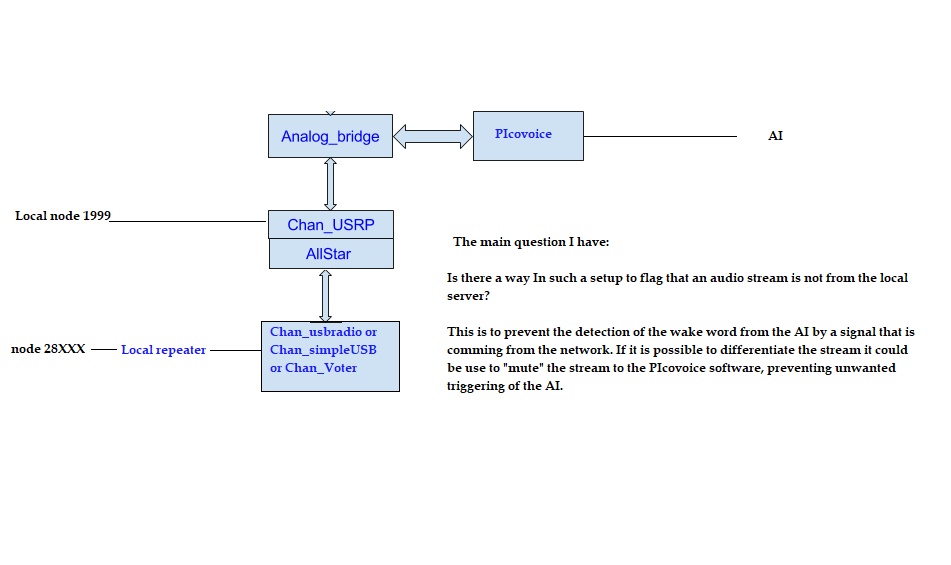
I attached an image on how this could be done. But I also
have some question…
As you can see I think that using the Chan_USRP driver
to the Analog Bridge from the DVSwitch project there is a
way to talk back an forth to the AI (PIcovoice project)
This would be a local node (1999) to the server and
another node (28XXX) connected to the server by USBRadio or
Simple USB or Chan_Voter would be the radio interface to the
airwaves.
Now all this is nice and no one on the network links will
say the wake work for the local repeater and all is well.
NOT. It will happen that remote user will use the wake word
and the AI will be all over the place. NOT GOOD. So beside
using maybe another ctcss tone to enable the AI listening
audio stream, wich could be a good idea as only people in
the know would be able to trig the AI, is there another way
differentiate the audio stream from a local one to a network
one… I imagine that we could use a small script to turn on
or of muting on the audio stream to the AI?
Dont start trowing flames!! It is just for discussion and
having fun waiting for the code to be released by William…
( well I hope he will do it  )
)
It is a damn fun time to be in ham radio!
Pierre
VE2PF
_______________________________________________
App_rpt-users mailing list
To unsubscribe from this list please visit and scroll down to the bottom of the page. Enter your email address and press the "Unsubscribe or edit options button"
You do not need a password to unsubscribe, you can do it via email confirmation. If you have trouble unsubscribing, please send a message to the list detailing the problem.
App_rpt-users@lists.allstarlink.orghttp://lists.allstarlink.org/cgi-bin/mailman/listinfo/app_rpt-usershttp://lists.allstarlink.org/cgi-bin/mailman/listinfo/app_rpt-users
 )
)