I was doing some audio testing and noticed something very interesting, and highly relevant to the question of the necessity for 16K sample rates on AllStar / ROIP / VOIP.
Usually when you do an audio test with AllStar, you just do a parrot test, your audio is played back, and if it resembles your transmission closely enough and levels are in range then you assume all is good and move on. What people do not tend to do with AllStar however when doing an audio test is monitor the audio from an independent RF receiver, which will capture both your original RF signal and the parroted audio, making it very easy to then compare the two and see what exact coloration, distortion, level changes, etc. are being introduced.
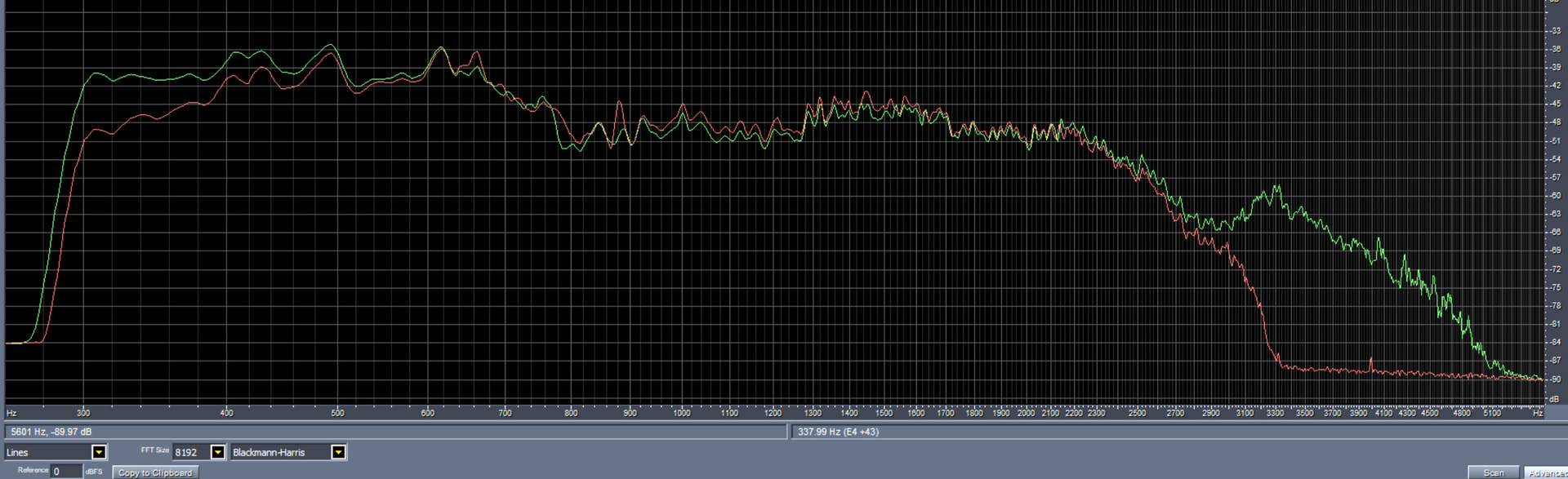
Here is just a quick graph of the frequency response of a ~10 second test message that I transmitted from one HT (KG-Q10H), into a node with an RT85 HT, and then had another Retevis HT receiving from both and recording into a Win PC audio editor. If I were to do this with white noise the graph would then be of the actual frequency response but even just with a normal voice test signal it’s very clear that the output from the node (red curve) drops to zero by 3.3KHz whereas the input signal from my HT on RF (green curve) has frequency content out to 5KHz.
I had noticed before that audio direct from one radio to another definitely sounds clearer than audio echoed back from ASL, but previously just assumed oh well that’s “just how it works”. This is a tendency of users and developers of any large system - there is inertia in the ways that things are in legacy systems and it takes a somewhat significant exogenous force sometimes for people to see that something in a system they are used to could actually be highly non-optimal.
20 years ago, 8K sample rates for VOIP/ROIP were “good enough” for the CPU power and network bandwidth limitations of the era, people became accustomed to that sound, and only a few audiophile / pro-audio types like Patrick and I ever thought anything of it.
After having now more carefully compared the differences in actual audio over RF from the radio going into a node vs. the audio transmitted from a node, I have to say that 8K sample rates no longer make sense in 2026, and should be obsoleted at the earliest opportunity.
As is clear in the above graph there is very significant frequency content and information out to at least 4.8 KHz, that is completely lost by ASL. The difference in clarity between the input and output signals really is pretty major when you listen to it. I could post example audio clips here but I think it’s better if people try it for themselves. Just take any HT or radio, run the speaker out jack into an audio interface / URI and record into a PC audio recording program (at 48KHz 16-bit). (Any of my URIs work great for this as they are fully functional Win/Mac/Linux audio interfaces).
There seems to be a belief that FM transmitters do very sharp filtering that limits audio bandwidth to ~3.5KHz but in reality that filtering is not overly sharp and there is quite a lot of detail on FM audio out to 5KHz. And it seems to be a common belief that anything above ~3.5KHz isn’t important, but that is also not true, and I would encourage everyone to listen for yourself to the difference in the actual audio going into your node or repeater system etc. vs. what it then plays back or sends out over the network.
Presumably 16Ksps audio is not going to happen soon in ASL3, so once &-ASL supports the basic functions used in AllScan nodes ie. DTMF commands, text-to-speech, easy updates, web dashboard with WiFi management support, etc. I will start offering &-ASL as an option in my node builds.